Color Replacer: Swap Specific Colors Without Losing Shading

Use our browser color replacer to swap target colors cleanly in any photo: sample with Eyedropper, dial Tolerance (5-80%), stack up to 6 From -> To swap rules while preserving highlights and shadows, and download free PNG without uploading files.

Opening browser tool…

How luminance-safe color swapping replaces a color without flat cartoon edges

Most quick recoloring hacks flood pixels with a flat hex fill, wiping out soft folds on jackets, bright specular highlights on ceramic mugs, and subtle studio shadow gradients. This online color replacer works in HSL brightness space: when Preserve lighting and shadows stays checked, only the hue and saturation shift toward your chosen target swatch while the pixel's lightness variation carries over intact.

Sampling a vivid hue also activates chroma-aware distance weighting, reducing the chance that pale beige walls, warm oak tables, or neutral midtone skin tints get washed out alongside bright clothing or branded hardware. When your source PNG includes a transparent cutout background, all transparent pixels stay completely untouched on export.

Every swap rule, tolerance pass, and full-camera export runs locally in client Web Workers up to 25 MB and 64 megapixels with zero watermarks or sign-in walls.

Eyedropper, Tolerance & Connected Region

Repaint specific objects cleanly with Preserve lighting and Connected flood fill

Sampling a spot on the source image with Eyedropper records an exact spatial seed alongside the sampled hex color and automatically activates Connected region only. Instead of recoloring matching oranges everywhere across posters or drapes, only the connected object body swaps smoothly.

  • Included radio preset swaps warm #df5c15 & #cf5110 orange onto deep #0f766e teal at 25% and 24% tolerance
  • Toggle Connected region only off anytime when intentionally shifting matching hues globally
  • Compare Preserve lighting & shadows ON vs Flat fill live across the Split Compare handle
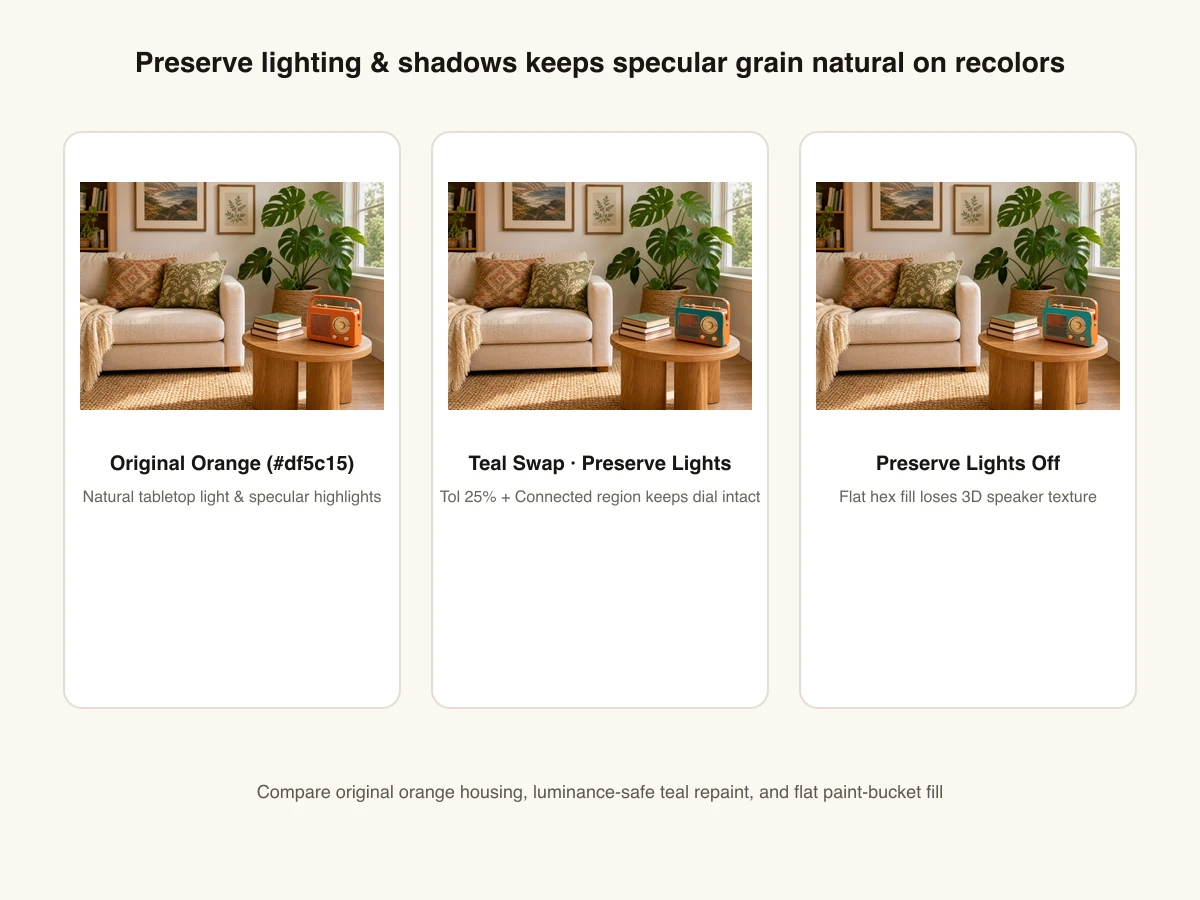
Orange tabletop radio recolored cleanly to teal keeping natural lighting versus flat fill
Up to 6 Stacked Swap Rules

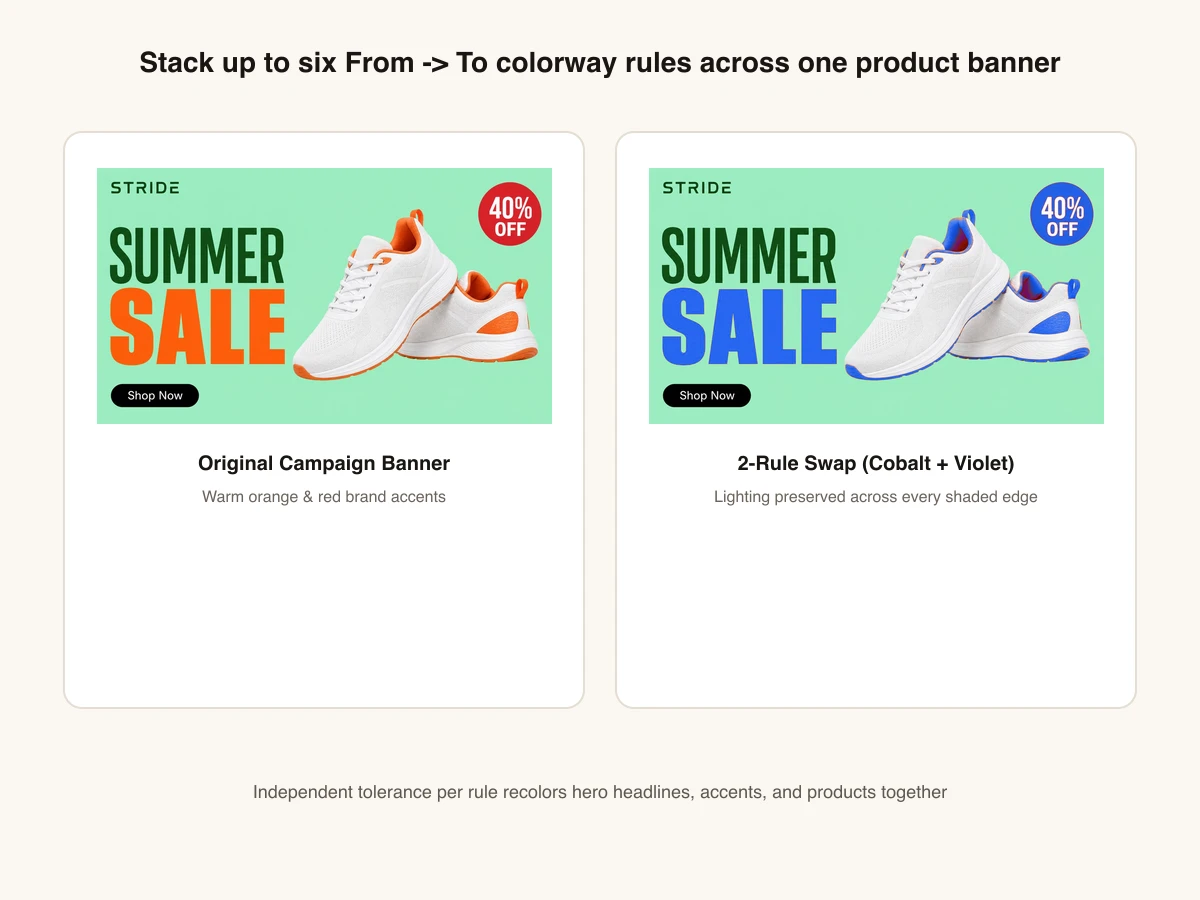
Combine multiple From -> To color swaps in one pass on banners and SKUs

Real product shots and promo banners rarely use a single ink tone: shoes mix accent piping with red tags, and packaging separates trim from hero labels. Click Add rule to stack up to 6 independent From -> To rules inside one session, each tuned cleanly with its own 5-80% Tolerance slider.

  • Built-in sneaker demo pairs orange -> cobalt (#2563eb, 42%) with red -> violet (#7c3aed, 34%)
  • Select any rule card in the right sidebar to aim the Eyedropper directly at that swap pair
  • Transparent PNG inputs export as full-resolution RGBA PNGs keeping clean cutouts intact
Two simultaneous colorway rules shifting orange and red accents cleanly across a sneaker banner

Color Replacer vs Photoshop Color Replacement Tool vs Paint Bucket

Pick the fastest approach depending on lighting realism, multi-rule swaps, and software access.

FeatureLayerSplit Color ReplacerPhotoshop Color Replacement ToolClassic Paint Bucket
Install & uploadBrowser offline, zero server uploadRequires desktop Photoshop installFlat pixel fill inside desktop or basic web apps
Shading & highlightsPreserves lighting relief automaticallyManual Tolerance + Mode brushingOverwrites specular lighting into solid blobs
Batch multi-rule editsStack up to 6 non-destructive From -> To rulesManual brush strokes per regionManual click per enclosed contour
Transparent background PNGMaintains transparent cutouts cleanlyPreserved when lockedCan bleed across anti-aliased edges

Want to collapse an entire photo into 2-16 flat graphic color bands instead of replacing specific colors cleanly? Try Posterize Image.

How to replace a color in a photo without Photoshop

  1. Open a sample or upload JPG, PNG, or WebP

    Preview right away on our retro orange radio or sneaker promo banner, or upload photos up to 25 MB / 64 MP offline.

  2. Click Eyedropper and tap your source color

    Click the Eyedropper toolbar button, tap directly onto the original side of the object to lock hex + connected region seed, and pick your target color.

  3. Adjust Tolerance (5-80%) and add rules

    Start around 24-35% Tolerance, add up to 6 simultaneous rules with Add rule if shadows split across two hues, and keep Preserve lighting & shadows on.

  4. Export full-resolution transparent or flat PNG

    Click Download PNG to save camera-resolution PNG artwork with zero watermarks or daily quotas.

Three recolor workflows: sneakers, retro hardware, and UI badges

  • Sneaker & ecommerce SKU colorways

    Input: vivid painted trims. Settings: stack 2 rules (primary orange + secondary red, 34-42% tol). Limit: pure white midsoles require a layered PSD mask.

  • Hardware casing & interior swatches

    Input: tabletop product photos. Settings: click Eyedropper on sunny midtone, keep Connected region only checked, dial 24-28% tolerance. Limit: soft orange reflections on neighboring wood stay warm unless recolored.

  • PNG logo accents & UI badges

    Input: transparent icon PNGs. Settings: bump tolerance cleanly up to 35-45% across anti-aliased brand glyphs. Limit: multi-hue bitmap gradients export cleaner when first split via Image to PSD.

Clean offline privacy & honest color physics boundaries

Ecommerce photographers previewing seasonal apparel or packaging variants, indie devs skinning UI elements, and marketers localizing hero accent colors quickly on their own device.

What Color Replacer cannot swap cleanly, and what to use instead

  • Pure neutral grays, pitch black jackets, and pure white shirts share near-zero saturation with surrounding studio walls, clouds, and grout lines. Recoloring white/gray objects spills across the entire scene unless you isolate the object first with Image to PSD or Extract an Object.
  • Shifts targeted rule colors rather than applying an overall rainbow hue filter or erasing animated backdrops (for uniform moving stickers use Transparent GIF Maker or strip still scenes via Background Splitter).
  • Large photos over 25 MB or 64 megapixels can be scaled cleanly to 4,096 px inside the browser before sampling.

Color Replacer questions and answers

How do I replace one color in a photo without Photoshop?

Load any JPG, PNG, or WebP here, activate Eyedropper, click the target color on the original image side, pick your replacement hex swatch, dial Tolerance (typically 20-35%), and click Download PNG.

Does Color Replacer upload my product photos to any server?

No. Decoding, HSL lightness mapping, contiguous flood fill, and PNG file assembly run purely inside local browser Web Workers; your pictures stay on your device.

What does the Tolerance slider (5-80%) control?

Tolerance governs how closely surrounding shaded pixels must match your sampled RGB/chroma target to transition smoothly. Higher tolerances (35-60%) capture deep folded cloth shadows, while lower settings (15-25%) stay tight on painted logos.

What does Connected region only do when using the Eyedropper?

Connected region only runs a seeded flood fill from the pixel you clicked on canvas so only contiguous objects change color, preventing identical shades on background signage or furniture from shifting too.

Can I replace more than one color on an image at once?

Yes. Click Add rule to manage up to 6 independent From -> To color swap rules simultaneously, each preserving its own source swatch, target color, and tolerance slider.

Why do fabric folds, reflections, and shading stay realistic after swapping?

Leaving Preserve lighting and shadows enabled extracts original lightness relative to your sampled source hue and weaves that natural relief into the replacement swatch rather than stamping a flat fill.

Can I recolor a pure black, white, or neutral gray item cleanly?

Not directly by RGB color tolerance alone: zero-saturation grays look mathematically identical to concrete floors, shadows, and white walls. Pull the item onto its own transparent layer first via Background Splitter or Extract an Object.

Does Color Replacer preserve transparent PNG backgrounds?

Yes. Alpha transparency below visible pixel thresholds stays intact across previewing and full-resolution PNG downloads.

Is Color Replacer free with no watermarks or daily limits?

Yes. All browser recoloring rules and full-resolution PNG exports run free with zero watermarks, zero sign-up wall, and no export limits.

How is this different from Photoshop's legacy Color Replacement Tool?

Instead of painting carefully by hand with a circular brush tip across an installed desktop app, you sample once, adjust non-destructive slider rules globally or per connected region, and download instantly.

Need object masks so only one sneaker, jacket, or prop changes color?

Separate individual objects onto transparent Photoshop layers with AI on LayerSplit so masks stay locked regardless of scene colors.

More browser color and editing tools