Image Splitter: Cut Photos into Grids, Carousels & Posters

Divide JPG, PNG, or WebP images into exact row-by-column grid tiles, seamless panoramic swipe cards, or printable poster pieces in one numbered ZIP archive.

Opening browser tool…

Why exact pixel math eliminates white seams between tiles

Most naive grid cutters divide an image's width by the column count and truncate the decimal remainder. A 1,000 px wide banner split into 3 columns gives 333 px per slice, discarding the last pixel row or leaving a hairline white seam when stitched back together on Instagram or a multi-page poster.

This workspace computes every column and row cut through cumulative integer rounding across width and height. Tile widths sum back to the exact original canvas width down to the single last pixel, so swipeable panoramic carousels meet seamlessly edge to edge.

Processing runs inside a browser Web Worker when supported, so even 12 × 12 multi-tile ZIP exports stay responsive with a live progress bar and a Cancel button.

Instagram & Xiaohongshu grids

Turn square visuals into 3 × 3 murals with clean numbering

Every slice is numbered left-to-right, top-to-bottom (#01 through #09 on a 3 × 3 grid). Inspect individual tiles in Tile Preview mode or grab one single numbered crop without unpacking a ZIP when you only need to re-upload one tile.

  • Upload order tip: post 3 × 3 profile tiles in reverse order (#09 down to #01) so #01 sits top-left
  • Supports lossless PNG, lightweight JPG, and modern WebP export formats per batch
  • Cumulative integer cut bounds guarantee zero gaps on odd-numbered photo dimensions
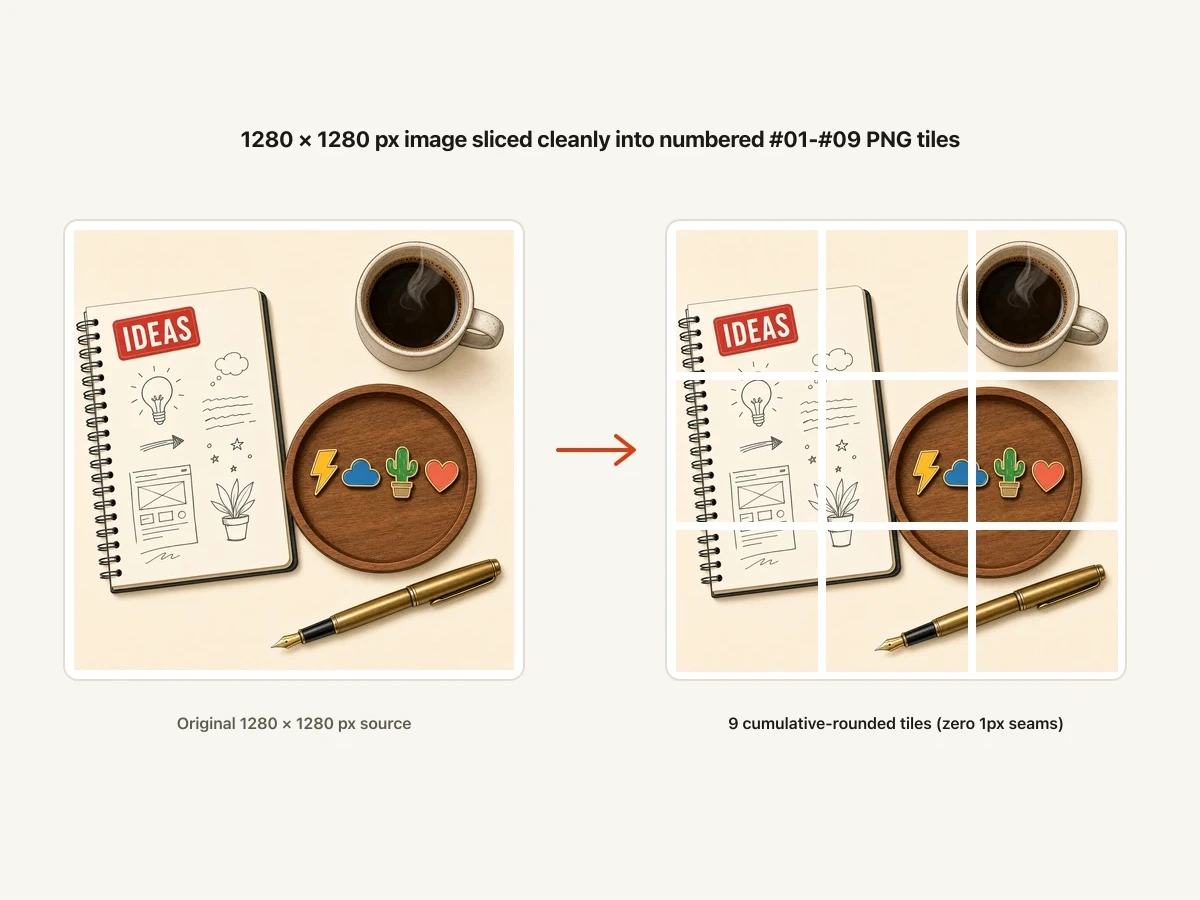
Original 1280x1280 desk flatlay photo split cleanly into nine cumulative-rounded square PNG tiles labeled 01 through 09
Seamless swipe carousels & print posters

Stretch one 21:9 landscape across 3 to 4 continuous swipe slides

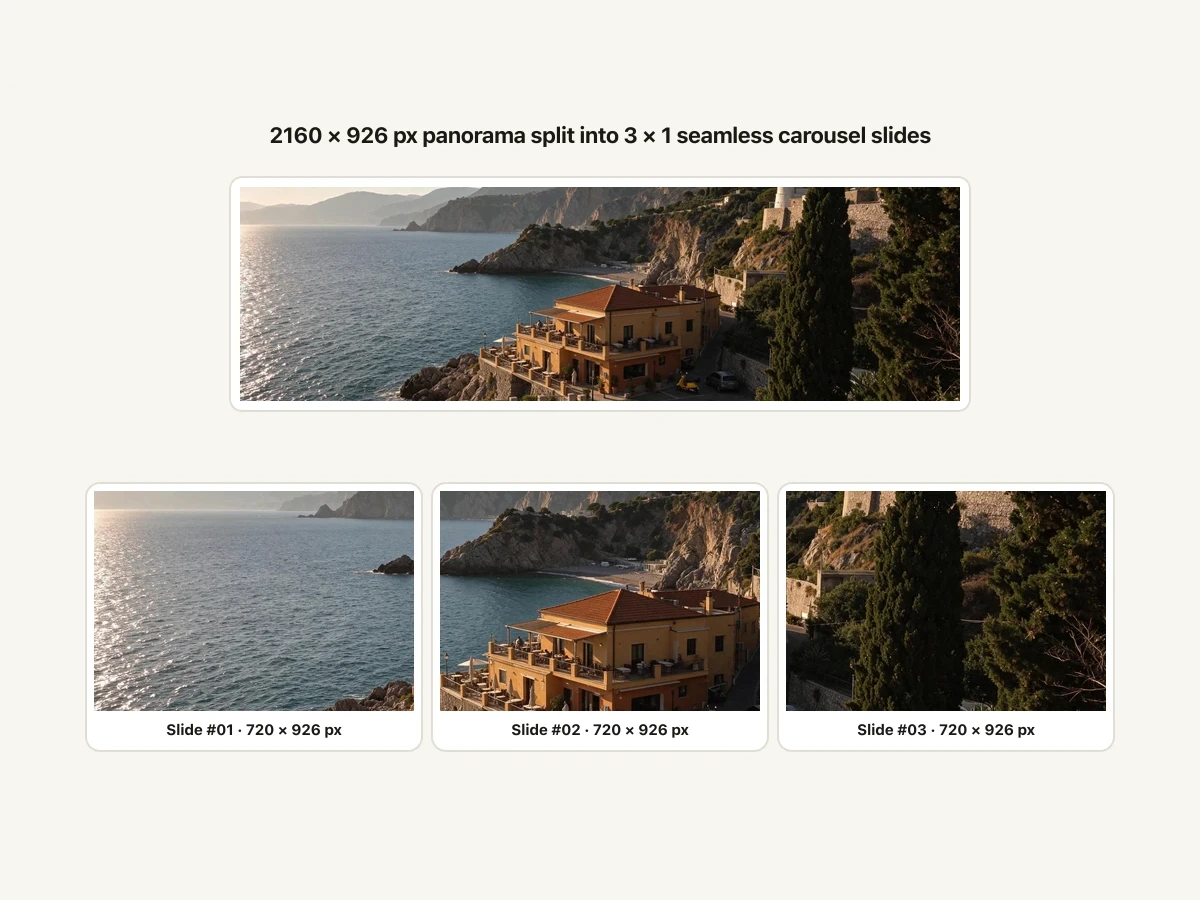
Switch to Carousel mode (3 × 1 Panorama or 4 × 1 Carousel) to split ultra-wide landscapes, editorial spreads, or product comparison strips cleanly across sequential feed cards without cropping away edges.

  • Custom Columns × Rows grid supports anywhere from 1 × 1 up to 12 × 12 (144 tiles maximum)
  • Click any cell overlay directly on the canvas to preview its exact pixel dimensions (W × H px)
  • Save individual tiles directly or bundle every numbered crop (row and column filenames) into one ZIP file
2160x926 Mediterranean coast panorama sliced horizontally into three continuous 720x926 carousel slides

Platform presets, grid layouts, and recommended image sizes

Choose a source dimension and grid count that keep every exported slice crisp after upload.

Split goalMode & PresetRecommended input sizePer-tile output size
Instagram 3 × 3 profile wallGrid · 3 × 33,240 × 3,240 px (1:1)1,080 × 1,080 px (9 tiles, PNG/JPG)
Instagram 3-card panoramaCarousel · 3 × 13,240 × 1,350 px (or 3,240 × 1,080)1,080 × 1,350 px (4:5 portrait cards)
4-slide continuous swipeCarousel · 4 × 14,320 × 1,350 px1,080 × 1,350 px across 4 slides
2 × 2 square quad postPoster · 2 × 22,160 × 2,160 px1,080 × 1,080 px (4 tiles)
Large office wall posterPoster · up to 12 × 124,096 × 4,096 px (high-DPI source)Print each tile on letter/A4 sheets and trim

All tiles export at 1:1 native pixel resolution from your source image with zero forced downscaling.

How to split an image into clean tiles

  1. Pick a JPG, PNG, or WebP up to 25 MB

    Drop any local image onto the stage or test instantly with the 1,280 × 1,280 desk flat-lay or 21:9 coastal panorama samples.

  2. Set Columns × Rows or pick a preset

    Choose Grid, Carousel, or Poster mode, click presets like 3 × 3 IG Grid or 3 × 1 Panorama, or dial custom values up to 12 × 12.

  3. Audit grid lines or switch to Tile Preview

    Review cut boundaries right on your image, click Tile Preview to inspect each #01 card isolated, and choose PNG, JPG, or WebP output.

  4. Save one tile or download all slices in ZIP

    Export just the currently selected numbered tile with Save tile, or encode every piece into a numbered ZIP off the main thread.

Why slice images inside a local browser worker

Ideal for social creators, marketers, and print makers

Social media managers formatting continuous carousel posts, illustrators breaking murals into IG grid walls, and teams splitting large diagrams across printable A4/Letter sheets.

Honest boundaries & troubleshooting tips

  • Files heavier than 25 MB are stopped cleanly upfront so the browser tab stays stable; convert uncompressed TIFF/BMP exports to PNG or JPG before uploading.
  • Canvases larger than 64 megapixels exceed safe Safari and mobile GPU limits; click Resize to 4,096 px & continue on the error card to downscale cleanly in-browser.
  • Maximum grid size is 12 × 12 (144 tiles). Need loose PSD layer files from a layered artwork instead? Use PSD Layer Extractor or PSD to PNG.

Image Splitter questions and answers

Is this image splitter free, and does it add watermarks or daily limits?

Yes. Slicing images to PNG, JPG, or WebP single tiles or ZIP archives is completely free in your browser with zero watermarks, zero sign-in, and no daily cap.

In what order should I upload a 3×3 split to Instagram so the picture aligns?

Our ZIP numbers tiles top-left (#01) to bottom-right (#09). Because Instagram adds newest posts first at the top-left of your grid, upload #09 first and finish with #01 last.

Why does cumulative rounding prevent white gaps between grid tiles?

If a 1,000 px photo splits into 3 columns cleanly as 333, 333, 334 instead of three truncated 333 px slices, every pixel is preserved and adjacent tiles align flush with zero seams.

Does cutting an image into grid pieces reduce sharpness or resolution?

No. Each crop draws directly at 1:1 native pixel coordinates from your original file. Pick PNG output for zero compression loss or JPG/WebP when smaller upload weight matters.

What file formats can I upload and export?

You can upload JPG, PNG, or WebP photos up to 25 MB (64 MP max), and choose PNG, JPG, or WebP for your exported single tiles or ZIP archive.

Can I download just one slice instead of a ZIP with all tiles?

Yes. Click any numbered cell in Grid Lines or Tile Preview mode and use the Save tile #01 button to download that single tile immediately.

What happens if I upload an oversized 80 MP camera photo?

The browser workspace blocks canvases over 64 MP cleanly before tab memory spikes and offers a one-click Resize to 4,096 px & continue button so you can finish slicing immediately.

Can I use this image splitter on an iPhone or Android phone?

Yes. On screens around 390 px wide, the workspace stacks the interactive grid stage and keeps quick sample access plus a sticky bottom ZIP download button within thumb reach.

What is the maximum number of rows and columns I can cut?

Both Columns and Rows accept any integer from 1 to 12, giving up to 144 numbered tiles (12 × 12) in one export.

What is the difference between Image Splitter and LayerSplit AI separation?

Image Splitter cuts rectangular tiles in your browser (good for feeds and tiled printing), whereas Image Layer Separator uses AI credits to lift overlapping foreground subjects onto independent transparent layers.

Need AI to extract objects inside your photo instead of tiles?

Use credits on LayerSplit to lift foreground subjects, text overlays, and backgrounds onto separate transparent PNGs or a layered PSD.

Explore more tools