Halftone Generator: Crisp Mono Dots & 4-Plate CMYK Screens

This free halftone generator runs locally in your browser: turn photos into Newspaper mono dots, Comic Dots, Line Screen engravings, or angled 4-plate CMYK rosettes, then download PNG, scalable SVG vectors, or layered PSD free.

Opening browser tool…

Halftone presets explained and choosing Mono Ink vs CMYK 4-Plate

Every preset sets color mode, cell geometry, angle, and stock tone in one click so you can start accurately before fine-tuning Dot cell spacing (5-24 px). Newspaper switches to Mono Ink Circle dots at 8 px, 45 deg, charcoal #1e2022 ink on warm #f4efe6 stock; Line Screen chooses Mono 30 deg crimson (#d63f14) stripes at 12 px on white.

When full-color pop art or commercial four-color simulation is the goal, CMYK Print (10 px) and bold Comic Dots (11 px) engage CMYK 4-Plate mode, separating tones across rotating Cyan, Magenta, Yellow, and Black lattices stacked cleanly for screen overprint.

Pick Mono Ink for single-ink zines, tote silkscreens, and wood engravings; switch to CMYK 4-Plate whenever multi-hue color rosettes or a separated 5-layer Photoshop file with Multiply blend plates is required.

Preserved Ink Aesthetics & Shapes

Pick Newspaper, Comic Dots, or Line Screen plus Circle, Diamond, or Line dots

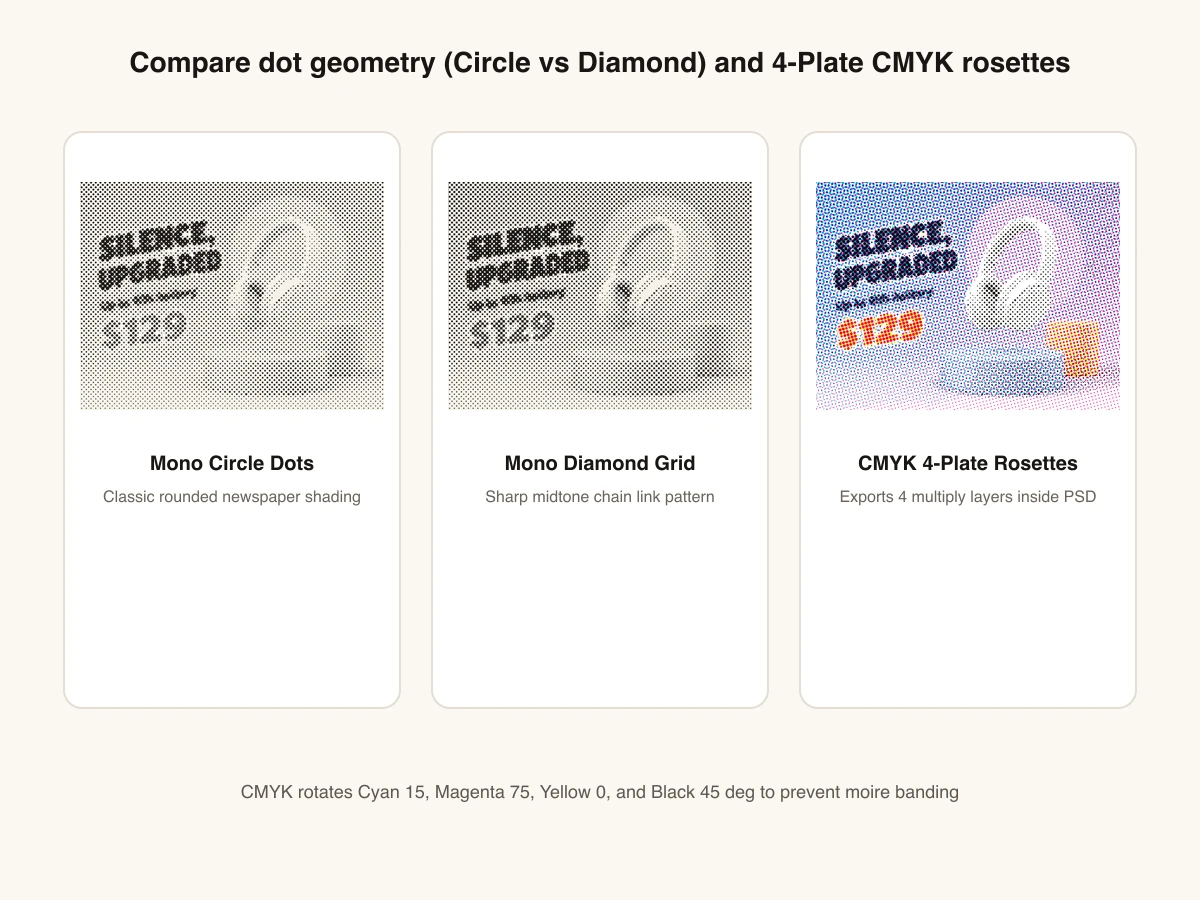
Screen shape subtly transforms print personality. Classic Circle dots capture photographic tones seamlessly without harsh texture clashes, sharp Diamond grids create nostalgic printshop chains across midtones, and parallel Line modulation turns portraits into vintage currency or linocut engravings.

  • Adjust Dot cell spacing live from fine 5 px editorial grains up to bold 24 px pop dots
  • Tune Mono ink and paper hex swatches freely for bright orange zine ink on cream card
  • Shift Mono screen angle between 0 and 90 deg in smooth 5 deg increments
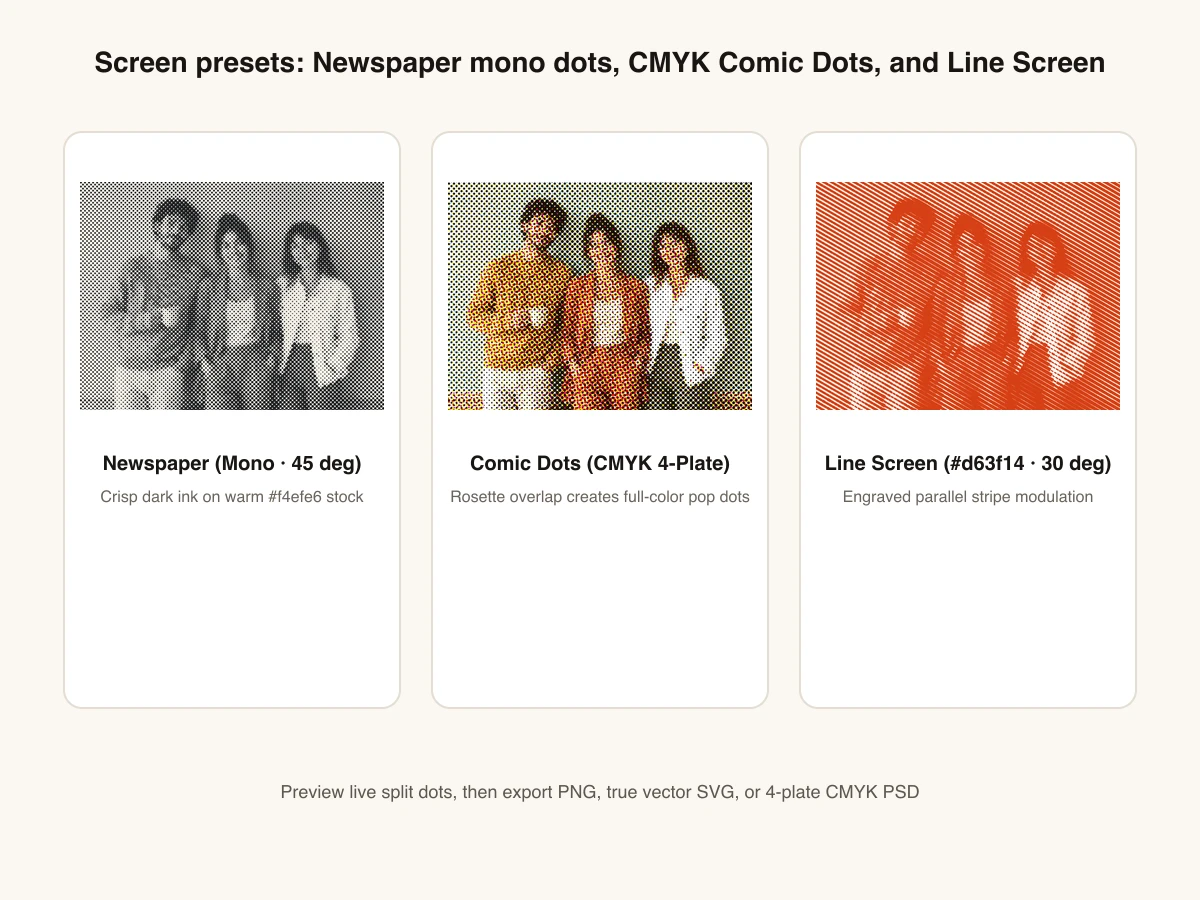
Three presets rendered on studio portrait showing Newspaper mono dots, Comic Dots CMYK, and 30 deg crimson Line Screen
Rosette Math & Anti-Moire Angles

Why CMYK plates lock to Cyan 15, Magenta 75, Yellow 0, and Black 45 degrees

Overlaying four grid channels at identical angles creates distracting zebra interference ripples called moire. Staggering Cyan (15 deg), Magenta (75 deg), Yellow (0 deg), and Key Black (45 deg) distributes screen ink into symmetrical optical rosette clusters that blend smoothly into rich color tones - and exports all four overprinting Multiply layers cleanly on top of a white Paper Background inside one Photoshop PSD.

  • 4-Plate CMYK PSD includes Cyan Ink, Magenta Ink, Yellow Ink, Black Key Ink + Paper Background
  • True vector SVG groups CMYK screens with mix-blend-mode:multiply paths instead of embedded bitmaps
  • Also download vector SVG directly inside CMYK mode right from the settings panel button
Comparison on headphones gradient comparing Mono Circle, Mono Diamond, and CMYK 4-Plate rosette plates

Halftone export formats: PNG vs true vector SVG vs 4-Plate CMYK PSD

All three browser exports run locally free of charge with zero watermarks.

Export ButtonFile ContentsWhen to Use Each Output
Download PNG · freeFull-res RGB composite rendered over chosen Paper colorDirect social headers, album art, DTF opaque transfers, blog cards
Export SVGPure vector circles, rotated squares (diamond), or variable-stroke linesInfinite enlargement for poster wall prints, vinyl/screen film positives, Figma/Illustrator
4-Plate CMYK PSDWhite Paper layer + 4 independent Cyan/Magenta/Yellow/Black Multiply platesInspecting dot gain overprint, muting 1 ink channel, or recoloring plates in Photoshop

Exported SVGs store pure vector nodes rather than wrapping a bitmap image inside XML, keeping edges tack-sharp even on billboard printouts.

How to convert a photo into halftone screens or print plates

  1. Open a portrait or smooth product gradient

    Inspect our studio portrait or gradient headphones sample immediately, or upload any JPG, PNG, or WebP up to 25 MB.

  2. Choose a screen preset or Mono vs CMYK mode

    Click Newspaper, Comic Dots, Line Screen, or CMYK Print, then adjust Dot shape (Circle, Diamond, or Line) and Ink/Paper hex swatches.

  3. Scale Dot cell spacing (5-24 px)

    Keep fine 6-8 px spacing for faces and smaller print sizes; step up to 12-20 px for bold graphic shirts and Ben-Day retro pop posters.

  4. Save PNG, pure SVG vector, or 4-Plate PSD

    Click Download PNG, Export SVG (available in both Mono and CMYK panels), or pack a layered 4-Plate CMYK PSD locally.

Halftone for DTF transfers, screen printing, riso zines, and retro posters

  • DTF apparel & screen printing film positives

    Start with Newspaper (Mono Ink, Circle, 8-12 px spacing) and click Export SVG for razor-sharp film positives matching textile ink mesh limits.

  • Risograph zines & comic Ben-Day spreads

    Use Line Screen or CMYK Comic Dots (10-14 px spacing), then export 4-Plate CMYK PSD so you can hide black plates or swap Riso soy ink colors in Photoshop.

  • Retro pop posters & landing hero backgrounds

    Export high-resolution halftone PNGs over warm cream paper (#f6f2ea), or tile oversized wall posters cleanly with Image Splitter.

  • Strict offline privacy for commercial client proofs

    Because every lattice pass, vector node serialization, and Photoshop file pack builds locally inside browser memory, pre-release brand assets stay strictly on your device.

Halftone vs Posterize vs Pixel Art vs Stencil Maker

Pick the graphic conversion method that fits your output medium.

LayerSplit ToolVisual TechniqueVector / PSD SupportBest Chosen For
Halftone GeneratorAngled dot or line arrays modulating gray/CMYK luminancePNG, true SVG, 4-Plate PSDEditorial print dots, DTF fades, CMYK screen separations
Posterize ImageSmooth 2-16 K-Means or Uniform flat color zonesPNG + Layer per Color PSDSolid screenprint plates, flat travel illustrations
Photo to Pixel ArtBox-averaged square pixel grid with PICO-8/NES palettesScaled PNG + crispEdges SVG8-bit sprites, avatars, tileable retro game art
Stencil Maker1-4 grayscale cut bands with red trapped-island guidePNG + single-page PDFMylar craft cutters, pumpkins, physical spray bridges

Practical print & file boundaries to keep in mind

Apparel DTF preparers, indie comic inkers, printshop prepress leads, and digital illustrators needing clean halftone vectors and 4-plate PSD separations without bloated desktop plugins.

Exact technical limits & troubleshooting notes

  • Outputs composite over your selected Paper hex color (#ffffff or #f6f2ea by default); transparent background PNG export is not emitted here (for crisp alpha cutouts without paper fills use Silhouette Maker or SVG to PNG).
  • Accepts JPG, PNG, and WebP photos up to 25 MB and 64 MP (with one-click 4,096 px browser downscaling). Very small headlines under ~10 px blur inside coarse 12+ px dots; keep crisp lettering separate in Poster to Layers or vector SVG to PNG.
  • Smooth portraits with faint contrast lose eye and nostril shape under wide dots - bump photo brightness/contrast slightly or keep spacing around 6-9 px before converting.

Halftone Generator questions and answers

Is this halftone generator free across PNG, SVG, and 4-Plate PSD exports?

Yes. Both PNG raster downloads, pure SVG vector exports, and local 4-Plate CMYK PSD downloads run free in your browser with zero watermarks and no sign-in.

Do my uploaded images get sent to any remote server?

No. Screen luminance sampling, rosette angle calculations, SVG node building, and PSD plate packing run locally inside client browser workers.

What is the difference between Mono Ink and CMYK 4-Plate?

Mono Ink screens tonal value into a single custom dot ink color over your chosen paper hex (with 0-90 deg angle adjustment). CMYK 4-Plate builds Cyan (15 deg), Magenta (75 deg), Yellow (0 deg), and Black (45 deg) overprinting layers.

What layers are inside the downloaded 4-Plate CMYK PSD?

Each PSD holds five clean layers: a solid white Paper Background base beneath four dedicated Cyan, Magenta, Yellow, and Black screen layers set to Multiply blend mode.

Is the SVG real vector geometry or a raster PNG wrapped inside SVG?

True vector SVG shapes: circle elements, diamond polygons, or variable-width strokes inside clean XML, scaling cleanly to poster murals with zero pixelation.

What dot cell spacing (default 7 px) should I pick?

Keep spacing around 6-8 px for portraits and crisp editorial graphics viewed up close; step between 11 and 20 px for bold Ben-Day comic dots, billboard posters, or DTF shirts.

When should I pick Newspaper versus Comic Dots presets?

Pick Newspaper for classic monochrome single-plate prints on off-white stock (45 deg black circle dots). Pick Comic Dots when vibrant full-color cyan/magenta/yellow halftone pop textures are wanted.

How does this compare to Photoshop's Color Halftone filter?

Photoshop's filter destructively flattens onto one raster image with no true vector SVG export and requires desktop software. LayerSplit delivers pure SVG vectors plus a pre-separated 4-layer Multiply PSD right inside any browser.

Does the halftone PNG keep transparent backgrounds?

No - halftone screens paint ink dots onto a solid Paper color swatch (default warm #f6f2ea or crisp white #ffffff), rather than leaving empty alpha backgrounds.

What image formats and maximum size are supported?

Upload JPG, PNG, or WebP files up to 25 MB and 64 megapixels. Larger camera shots offer one-click client scaling to 4,096 px long side.

Can I use exported PNG, SVG, and PSD halftone graphics commercially?

Yes - exports are clean standard PNG, SVG, and PSD files built solely from your uploaded artwork with no watermarks stamped on files.

Does this workflow suit DTF shirt transfers and silkscreen printing?

Yes. Export high-contrast Mono SVGs for crisp film positives and screen exposure, keeping dot sizing above your print shop's minimum 1-2 mm curable ink threshold.

Need separated poster layers or 2-16 flat color plates alongside screens?

Split illustrations cleanly with AI via Image to PSD, or pack flat screenprint ink layers inside Posterize Image.

More browser screenprint and vector utilities