Edit Text in Image: Replace Words While Matching the Original Style

Change a time on a sign, a date on a poster, or a price on a label in your own pictures, and get the new words drawn in the same style. 10 credits a run, with two real samples to check first.

Your image10 credits · per run

Try a sample (0 credits)

For images you own or have the rights to edit. Uploads stay private and are deleted after 30 days.

Bakery Sign
Preparing preview...Decoding image locally in your browser.
Loading sample

Replace text

10 cr
Changes1 of 3

Type the original exactly as it appears, capitals included. Short words and numbers come out most reliably.

10 credits per run10 free on Google sign-up

Samples are free. A run that fails is refunded automatically.

Need editable Photoshop type layers instead of a flat image?Try Edit Text in Poster

When a quick edit beats rebuilding the design

Most text fixes are small. A shop opens an hour earlier, an event moves a week, a price drops by a dollar. Rebuilding the artwork in a design tool for one changed word is slow, and covering the old word with a box and typing over it shows from across the room.

This tool takes the change as two short pieces of text: the words as they are now, and the words you want instead. An AI image model redraws only those words, matching the lettering style, the angle of the surface they sit on, and the light falling on them, and leaves the rest of the picture where it was. You get one flat image back.

It is built for pictures you own or have the right to change: your own storefront signs, posters, menus, labels, and graphics. It is not for forging other people's documents or changing text in a way that misleads, and the result should always be checked by a person before it is published.

Real before and after

Check the result on two real pictures first

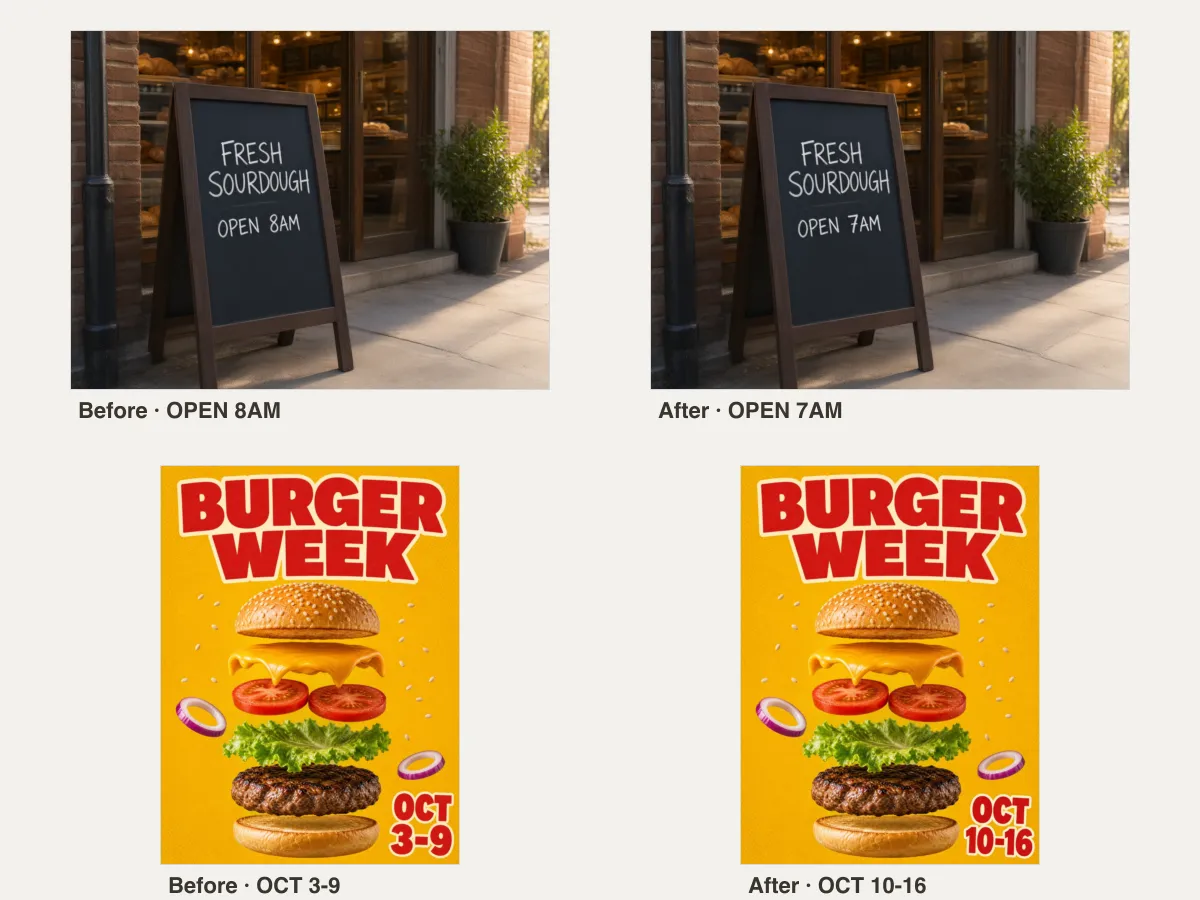
The samples are actual runs of this tool. On a bakery sandwich board, the second line changes from OPEN 8AM to OPEN 7AM, drawn in the same hand-lettered chalk with the same slant, while the headline above it stays word for word. On the Burger Week poster, the date changes from OCT 3-9 to OCT 10-16 in the same red outlined letters, and the burger, the onions, and the yellow dots do not move. Drag the divider across each one and look at the letter edges.

  • Results come back at about 1,800 px on the long side
  • Unedited words and objects are meant to stay identical
  • Download the edited image as a PNG
Bakery chalkboard sign changed from OPEN 8AM to OPEN 7AM and Burger Week poster changed from OCT 3-9 to OCT 10-16, before and after
Style that follows the surface

The new words keep the style, the angle, and the light

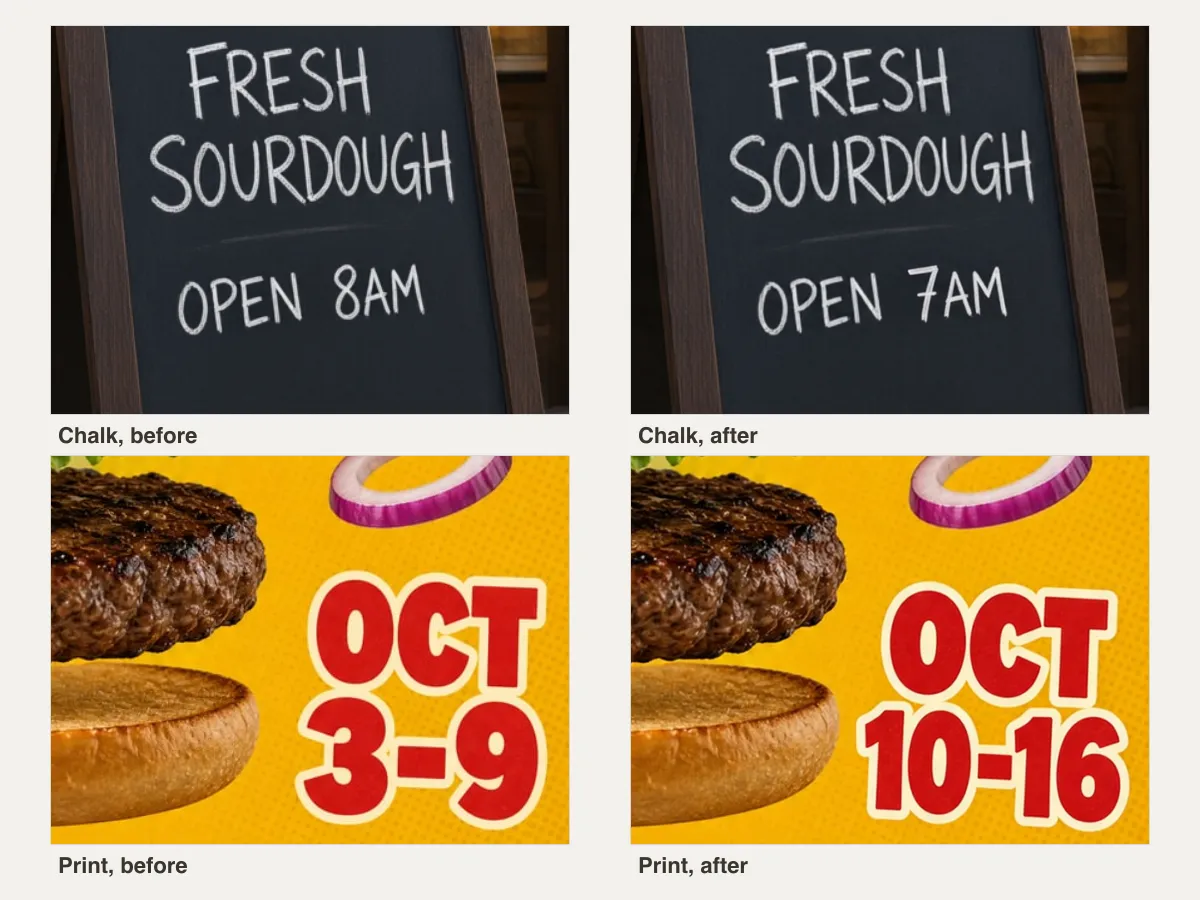
A chalk word on a board that is turned a little away from you looks different from a printed word on a flat poster, and a fix has to respect that. Leave Match lighting, perspective & texture switched on and the model draws the new words the way the old ones were drawn: chalk strokes on a slate board, thick outlined letters on a poster. Switch it off if you would rather have clean, plain lettering that only follows the surface.

  • Up to three changes per run, each up to 60 characters
  • Type the original exactly as it appears, capitals included
  • Short words and numbers come out most reliably
Close-up of the chalk and poster lettering before and after the text was changed

Edit Text in Image or Edit Text in Poster?

Both change words in a design. They differ in what you get back and what you can keep editing afterwards.

ToolWhat you getCostPick it when
Edit Text in Image (this page)One flat PNG with the new words drawn into the picture10 credits per runIt is a photo, a sign, a screenshot, or a graphic with no layers, and you want a quick fix
Edit Text in PosterEditable type layers and a PSD, with free live typingFree for typing, 10 credits for AI Style Match per layerYou will keep tuning the wording, fonts, and layout in Photoshop
Remove Text from ImageThe same picture with the words erased and the background rebuilt10 credits per runYou want the words gone, not replaced
Poster to LayersEvery element of a poster split into its own layer10 credits per layerYou need to rework the whole design, not only the text

If the wording will change again later, split the design into layers once and edit the text layer, instead of re-running a flat image each time.

How to edit text in an image

  1. Open a sample and compare

    The bakery sign opens with its change already filled in. Drag the divider, switch between Edited and Original, and try the Burger Week poster. None of this uses credits.

  2. Choose your image

    PNG, JPG, and WebP files up to 20 MB are accepted. Straight-on, sharp pictures with the words clearly readable give the best result.

  3. Type the original and the new text

    Fill in one to three rows. Write the original exactly as it appears, then the words you want instead, up to 60 characters each. Keep the style switch on unless you want plain lettering.

  4. Run it, compare, and download

    A run costs 10 credits and usually takes between 20 seconds and 2 minutes, and the studio shows the elapsed time. Check every changed word against the original, then download the PNG. A failed run is refunded automatically.

What this does well

Changes a few short words, dates, times, and prices on signs, posters, and labels

Draws the new words in the style, angle, and light of the old ones

Leaves the words and objects you did not name in place

Refunds a failed run automatically and tells you when the refund has settled

Honest limits

  • It redraws the whole picture, so check every changed word and the details around it before you publish
  • We tested English words and numbers; other alphabets and scripts may spell less reliably, so look at them closely
  • Long sentences, many changes, and very small print are more likely to come out wrong - keep to three short changes
  • Use it only on images you own or have the right to change, and never to mislead
  • For wording you will keep changing, use Edit Text in Poster instead
  • Files that fail validation never reach the model and never cost a credit

Edit Text in Image FAQ

How much does it cost to edit text in an image?

Each run costs 10 credits. The two samples and the before and after slider are free, and new Google sign-ins start with 10 credits.

How many words can I change at once?

Up to three changes per run, each up to 60 characters. Short words, dates, times, and numbers work best.

Will the new text match the old lettering?

That is what the Match lighting, perspective & texture switch asks for, and the samples show it on chalk and on a printed poster. Always compare the result with the original before you use it.

Does the rest of the image stay the same?

It is meant to. The model redraws the whole picture, so look at the area around the change and at any other text.

How should I type the original text?

Exactly as it appears, with the same capitals, spacing, and punctuation. A close but wrong match can leave the old words in place.

Does it work on other languages?

We tested English words and numbers. Other scripts may not spell reliably, so check them closely.

What size is the result?

About 1,800 px on the long side, in nearly the same shape as your image, as a PNG.

What happens if a run fails?

The 10 credits are returned automatically. If a refund is still being settled, the studio says so instead of claiming it is done. Uploads are deleted after 30 days.

Need to remove the words, or keep the design editable?

Erase text and rebuild the background, or split a poster into layers so the wording stays editable.

Explore more LayerSplit tools