PSD to PDF Converter Free Online in Your Browser

Convert PSD to PDF free in your browser with no server upload and no Photoshop required: inspect your layers first, pick Match PSD, A4, or US Letter sizing, choose single proof or one page per layer, and save up to 50 files cleanly.

Your filesFree · in your browser
No PSD at hand? Try one

Files are converted on this device, one at a time. No request carries them.

No file yet
Save as
Format
Page size
Compression
See-through areas flatten onto white. JPEG keeps PDF size small.
What to save
Size
Layer files

Exports the composite image as a 1-page PDF on white. Switch What to save for a multi-page layer PDF.

Opposite way: Image to PSD →

How to convert PSD to PDF without Photoshop and why local conversion matters

Most online PSD to PDF converters upload your proprietary design comps to remote cloud queues before processing can even begin, forcing wait times and exposing unreleased client files. Our PSD to PDF converter decodes .psd and .psb documents inside client Web Workers right inside Chrome, Safari, Edge, or Firefox - nothing is uploaded and no Creative Cloud seat is needed.

Whether you want a compact 1-page client approval proof, a multi-page layer deck showing background plates and typography separately, or standardized A4 / US Letter handouts, every visible layer composites cleanly onto crisp opaque paper right inside your tab.

You can queue up to 50 Photoshop files simultaneously, preview individual pages live, and save either one standalone .pdf or a batched ZIP archive with zero watermarks.

Single Proof vs Multi-Page Layer Deck

Save one flattened proof page or turn every PSD layer into its own PDF page

Generic converters flatten every PSD into a single static sheet. By switching What to save from Whole image to Every layer (or Both), every non-empty bitmap and rendered text layer renders onto a sequential PDF page so stakeholders without design software can review headlines, badges, and clean background artwork page by page.

  • Whole image writes a 1-page flattened composite ready for quick client sign-offs
  • Every layer outputs one opaque PDF page per layer (hidden layers included)
  • Open a real multi-layer showcase in PSD Viewer or check all sample splits
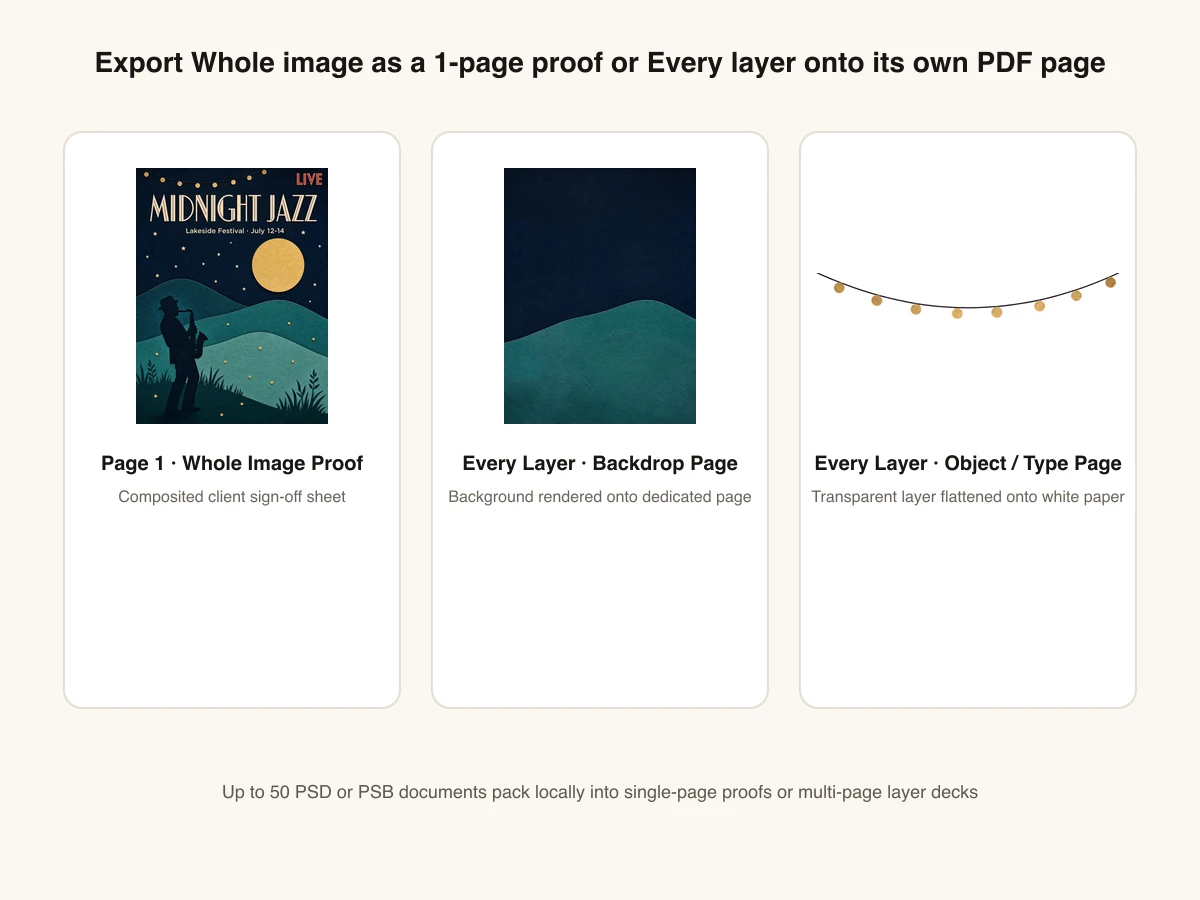
Midnight Jazz sample poster showing Whole Image 1-page proof versus dedicated Every layer PDF pages
Match PSD, A4, Letter & Flate Compression

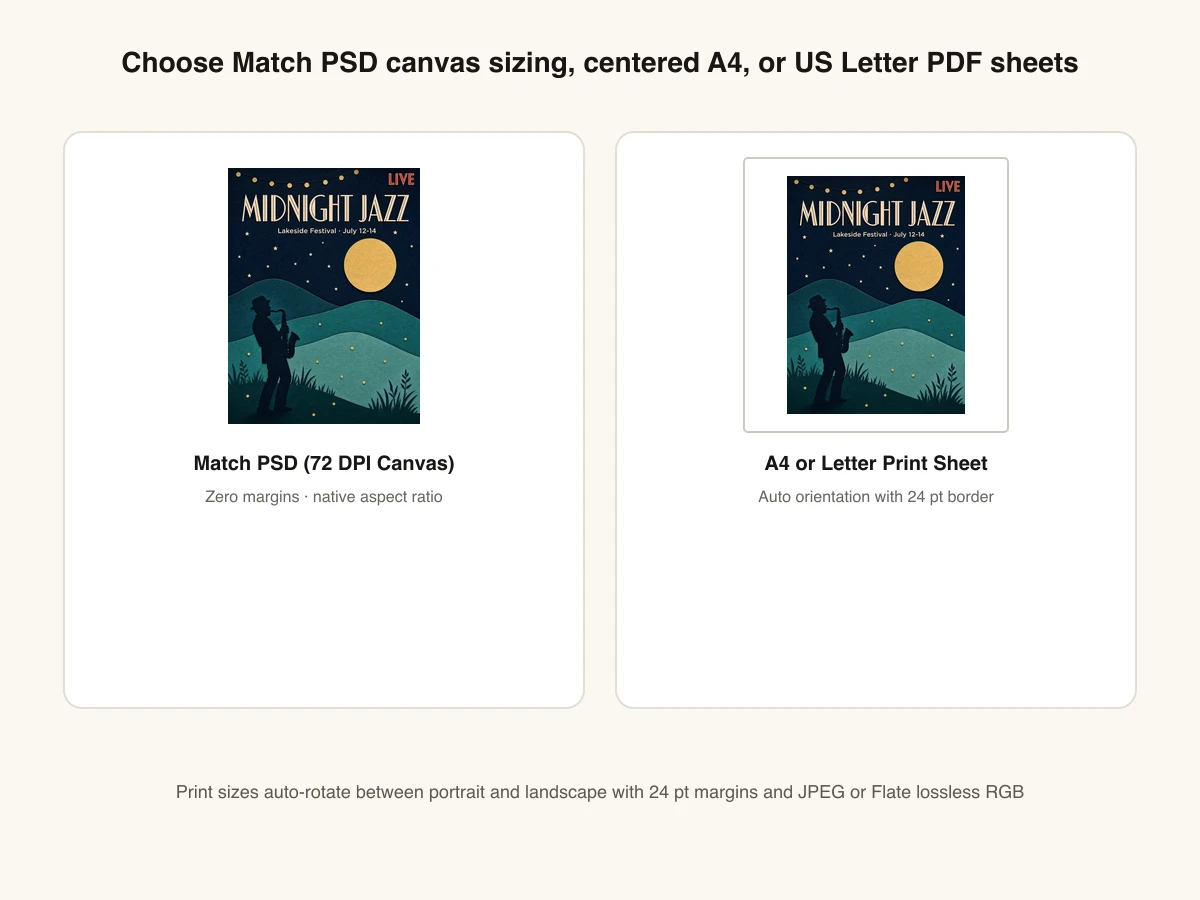
Fit artwork onto native Match PSD canvases, A4, or US Letter sheets

Pick Match PSD to size each PDF page precisely to your Photoshop pixel width and height at 72 DPI with zero margins, or switch to A4 (595.28 x 841.89 pt) and US Letter (612 x 792 pt) for instant printer-friendly handouts that auto-rotate between portrait and landscape centered inside a neat 24 pt border.

  • JPEG compression (quality 50-100, default 90) shrinks heavy photographic proofs for email
  • Lossless Flate RGB compression eliminates JPEG ringing around fine UI text and thin diagrams
  • Scale presets (100%, 50%, 25%) and longest-side caps (4096, 2048, 1024 px) curb file bloat
Comparison between full-bleed Match PSD PDF page and centered A4 or Letter print sheet with 24 pt margin

One page per layer vs one flattened proof vs Both

Pick the page-packing option aligned to client approvals or layer handoff.

What to Save SettingPages Created in PDFBest Practical Use
Whole image1 flattened composite page (visible layers only)Email sign-off proofs, slide previews, finished poster sharing
Every layer1 page per non-empty layer in stacking orderPrinting layer templates separately or verifying individual PSD art elements
BothPage 1 composite cover + sequential individual layer pagesSelf-contained handoff booklets pairing approved look with every layer plate

Need transparent PNG layers instead of opaque white-paper PDF pages? Switch directly to PSD to PNG or save compact JPGs via PSD to JPG.

How to convert a PSD file to PDF step by step

  1. Drop up to 50 PSD or PSB files

    Inspect the preloaded Jazz poster right away, or drag up to 50 local .psd or large-format .psb documents (up to 200 MB each) into the queue.

  2. Pick PDF size, page mode, and compression

    Select Match PSD, A4, or Letter, set What to save (Whole image, Every layer, or Both), and pick JPEG or Lossless Flate encoding.

  3. Review whole canvas or layer previews cleanly

    Flip between Whole image and Every layer views in the workspace preview so missing assets or cropping stand out early.

  4. Download single PDF or multi-file ZIP

    Save one .pdf straight to disk, or package all finished documents cleanly into a single batch ZIP.

PSD to PDF vs Photoshop Save as PDF (Print, Resolution & Color Reality)

Important technical facts on resolution (DPI), raster text, and RGB print color before printing.

AttributeLayerSplit Browser PDF ConverterAdobe Photoshop Save As PDF
Software & uploadWorks free on Mac, Windows, Linux & tablets; zero uploadRequires paid Photoshop desktop installation
Text selectabilityRasterizes Photoshop rendered pixels (text is non-selectable image)Preserves editable live vector type outlines & selectable text
Print DPI & colorEmits DeviceRGB pixels (A4 300 DPI needs ~2,480 x 3,508 px canvas)Supports native CMYK ink separation profiles and spot plates
Per-layer booklet exportOne-click Whole image, Every layer, or Both multi-page PDFRequires multi-step Layer Comps to PDF scripts

Always export your Photoshop proof at full resolution (Scale 100%, Longest side No limit) when targeting 300 DPI press runs (~2,480 x 3,508 px for A4 or ~2,550 x 3,300 px for US Letter).

Private client proofs across Mac, Windows, Linux, and mobile browsers

  • Your file never leaves your device

    Unlike server-side converters that queue confidential mockups on third-party workers, every canvas composite, DEFLATE Flate stream, and PDF xref byte table runs privately in your tab.

  • Safe batch queue up to 50 PSD or PSB files

    Process whole agency folders sequentially while releasing intermediate layer canvases cleanly one file at a time to protect browser tab stability.

  • Need editable PSDs starting from flat images?

    When stakeholders only send flat exports instead of Photoshop files, split elements back into layers using Image to PSD or Poster to Layers.

  • Pair lossless UI fidelity with light email sharing

    Keep Lossless Flate RGB active for tight software wireframes and typography, or step down to 50% / 2048 px JPEG quality ~85-90 for fast client threads.

Supported limits & common troubleshooting scenarios

Supports standard .psd and large-document .psb inputs up to 200 MB file size and 120 million source pixels, outputting up to 50 documents per batch cleanly up to 16,384 px side length and 100 million output pixels.

Troubleshooting: when a PSD to PDF export differs or stops

  • Rejected oversized canvas: files above 200 MB or exceeding 120 million pixels fail upfront before decoding; trim off-canvas pixels in Photoshop first, or scale down to 50% / 2048 px if only output size passes 100M px.
  • Effects, smart filters & adjustments: layer effects (drop shadows, strokes), adjustment layers, clipping groups, and vector masks are skipped during browser rasterization; flatten smart filters inside Photoshop for exact complex lighting proofs.
  • Fonts & non-selectable PDF text: type layers render using Adobe's cached preview pixels inside opaque raster JPEG or Flate RGB image streams - text cannot be copied or searched inside PDF viewers without running OCR afterward.
  • Large batch memory spikes on mobile: converting dozens of 50-layer documents simultaneously fills smartphone RAM cleanly past safe ceilings; split big queues into 5-10 file batches on phones.

PSD to PDF questions and answers

Can I convert PSD to PDF without Photoshop installed?

Yes. Upload .psd or .psb files straight into your browser tab on Mac, Windows, Linux, or Chromebook; decoding, compositing, and PDF assembly need no Creative Cloud subscription.

Is text inside the exported PDF selectable or searchable?

No. Pages embed rasterized RGB image streams rendered accurately from each layer's pixels (so missing system fonts never break typography), rather than live PostScript outline fonts. Run PDF OCR in Acrobat if searchable text selection is needed.

Can I convert PSD files to PDF on a smartphone or iPad browser?

Yes. Moderate-resolution flyers and mockups convert smoothly on phones; very large multi-hundred-MB PSB files convert more reliably on desktop RAM.

How is Whole image different from Every layer PDF export?

Whole image creates a clean 1-page flattened proof matching what Photoshop displays, while Every layer places each layer cleanly on its own numbered PDF page (pick Both to combine a cover proof plus layer pages).

Is PSD to PDF completely free with no watermarks or daily cap?

Yes. There is no account requirement, zero watermarks added onto PDF pages, and no daily limit beyond batching up to 50 PSD/PSB files per queue.

Are any uploaded PSD or PSB files sent to cloud servers?

No. Unlike server-upload PDF websites, files decode cleanly inside client-side browser Web Workers so artwork never leaves your machine.

How should I prepare high-resolution 300 DPI PDFs for A4 or Letter printing?

Keep Output size at 100% (Longest side: No limit) and ensure your source PSD canvas supplies enough pixels (~2,480 x 3,508 px for A4 or ~2,550 x 3,300 px for US Letter at 300 DPI), picking Lossless Flate if crisp hairline type matters.

What happens to CMYK colors and transparent backgrounds inside PDF?

See-through PSD pixels composite cleanly onto opaque white paper, and streams write into DeviceRGB without embedded CMYK spot inks. Convert final RGB PDFs into CMYK press proofs inside Acrobat or Illustrator when commercial offset plates require strict ink percentages.

How many PSD files can I convert at once?

You can queue up to 50 PSD or PSB documents together and export every converted PDF bundled cleanly into one ZIP download.

Why is my exported PDF huge and how can I make it smaller cleanly?

Large Lossless pages store uncompressed RGB arrays on 4000 px canvases. Switch PDF compression to JPEG around quality 85-90, lower Longest side to 2048 px or 1024 px, or use Whole image instead of exporting 30 hidden layers.

Need transparent cutouts or want to preview layer stacks first?

Inspect individual PSD groups safely in PSD Viewer, extract alpha-transparent PNGs, or convert flat images back into layered PSDs.

Related PSD converters