Remove Text from Image: Clean Result Without Blur or Smudges

Erase headlines, dates, price tags, or captions from your own posters and photos, and get the area behind them rebuilt instead of smeared. 10 credits a run, with three real samples to try first.

Your image10 credits · per run

Try a sample (0 credits)

For images you own or have the rights to edit. Uploads stay private and are deleted after 30 days.

Burger Week
Preparing preview...Decoding image locally in your browser.
Loading sample

Removal scope

10 cr
What to remove

Titles, headlines, words, prices, dates, and badges are all erased.

10 credits per run10 free on Google sign-up

Samples are free. A run that fails is refunded automatically.

Want to replace the words instead of removing them?Try Edit Text in Image

Why a rebuilt background beats blur and clone stamp

The usual fixes for unwanted text each leave a trace. A blur turns a crisp headline into a gray smudge. A clone stamp copies a patch from somewhere else, which repeats on a smooth gradient and tears across fabric, brick, or halftone dots. A solid box covers the words and creates a new shape that is just as obvious.

This tool treats the job as a repair. You tell it what to erase, and an AI image model fills each erased area with what would be there, continuing the surrounding color, grain, and light. On a flat yellow poster that means flat yellow with its dot texture. On a chalkboard it means a clean dark board with the smudges of chalk dust intact.

It is built for images you own or have the right to edit: your own posters, product photos, screenshots, and old event graphics. It is not a way to strip someone else's credit or watermark from their work, and it will not make that right.

Real samples, real results

Check the result on three pictures before you spend anything

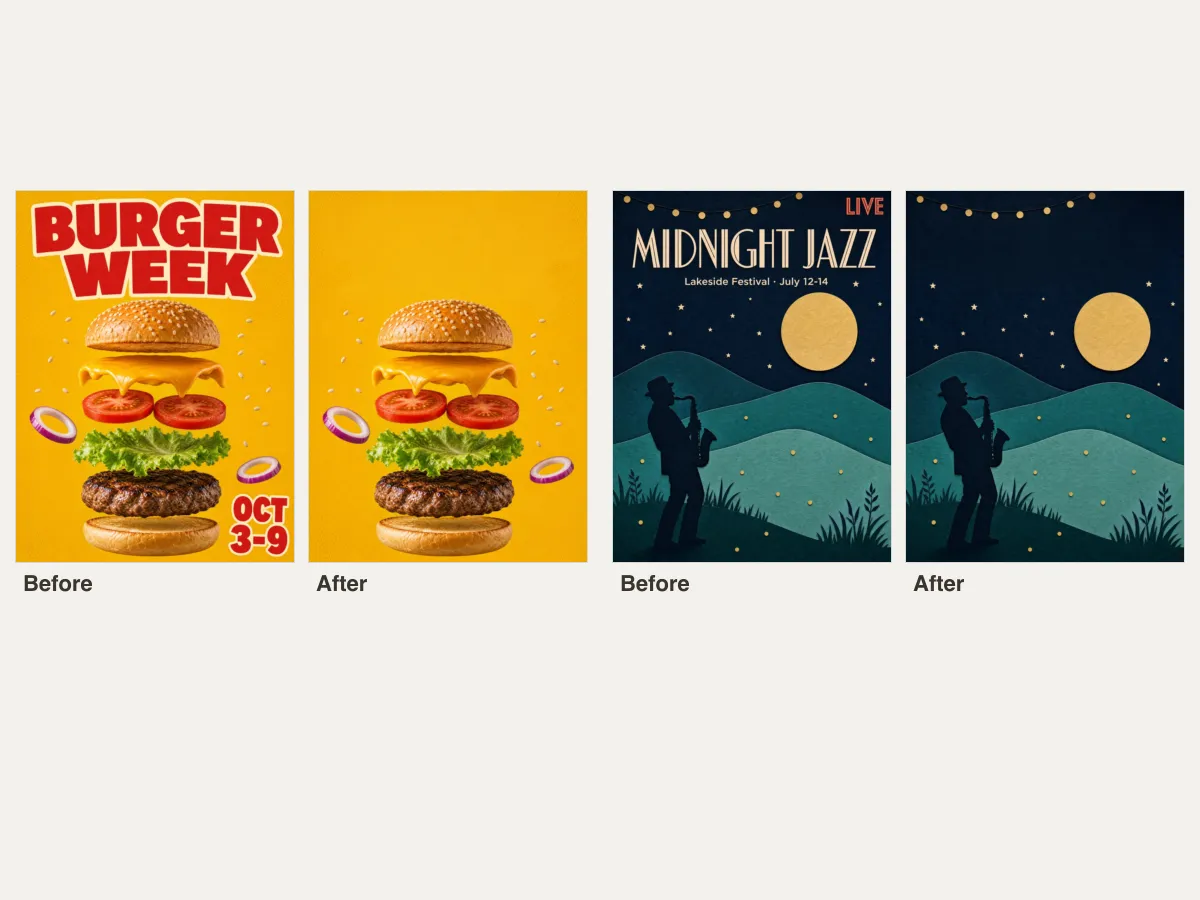
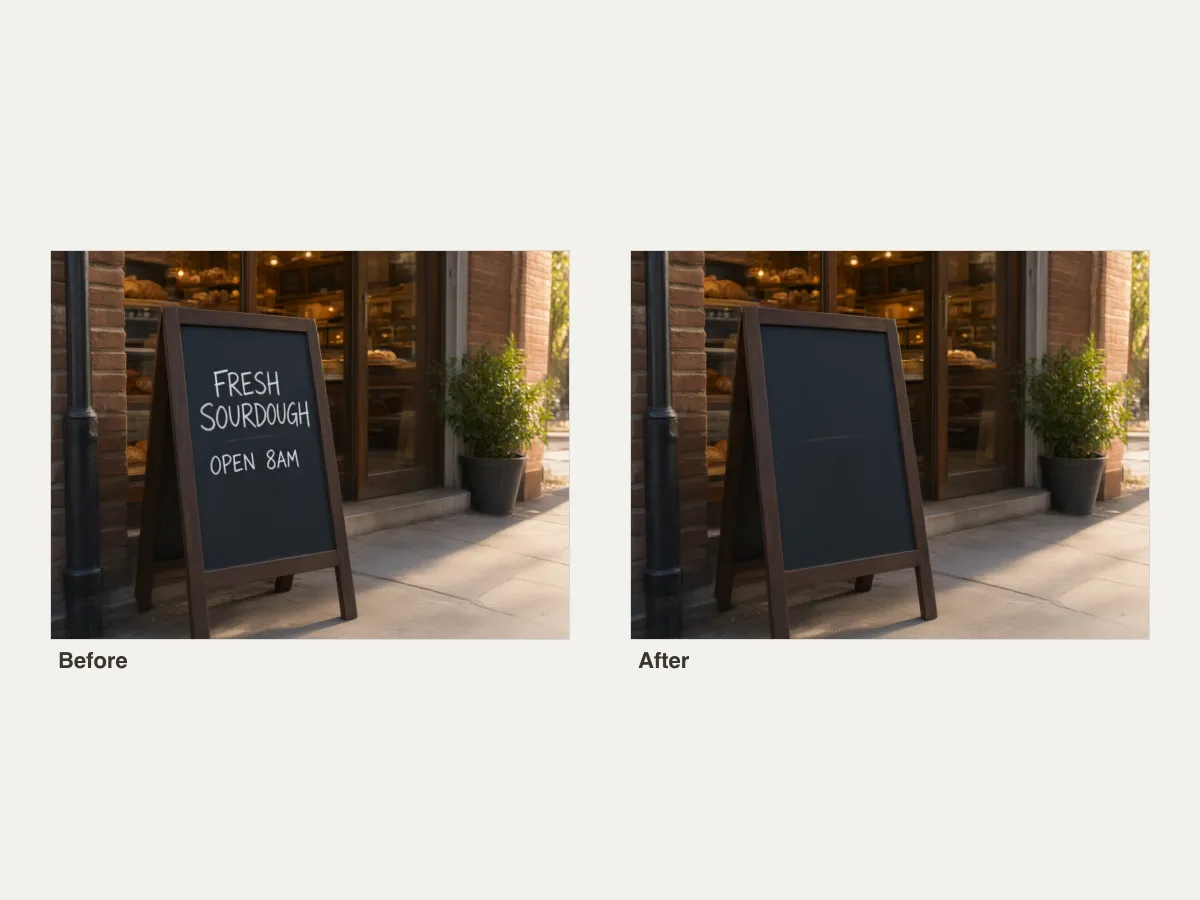
The samples are actual runs of this tool, not mock-ups. A Burger Week poster loses its title and dates and keeps the burger, the sesame seeds, and the yellow halftone background. A bakery sandwich board loses both lines of chalk and keeps the brick, the plant, and the soft light on the sidewalk. A jazz poster loses its lettering and keeps the moon, the hills, and the saxophone player. Drag the divider across each one and look at the edges.

  • Results come back at about 1,800 px on the long side
  • Everything outside the text is meant to stay as it was
  • Download the cleaned image as a PNG
Burger Week and Midnight Jazz posters before and after their text was removed
Text in real photos

It works on signs and screens, not only on flat graphics

Text that sits on a physical surface is harder, because the surface has perspective, lighting, and wear. The bakery sample shows the case: a hand-lettered sandwich board in afternoon sun, with the text gone and the board still looking like a real chalkboard. For photos with several kinds of text, you can limit the run to captions, or type only the words to remove.

  • All text removes titles, headlines, words, prices, dates, and badges
  • Captions keeps large printed lettering that is part of the artwork and erases captions, dates, and small badges
  • Specific removes only the text you type, up to 120 characters
Bakery chalkboard sign before and after its hand-lettered text was removed

Choosing the removal scope

The scope tells the model how much to erase, so pick the narrowest one that does the job.

ScopeWhat it erasesUse it forKeep in mind
All textTitles, headlines, words, prices, dates, and badgesReusing a poster or ad layout, clearing a sign or a labelEvery piece of lettering in the image is removed
CaptionsCaptions, subtitles, dates, and small callout badgesScreenshots, event photos, and posters with a big title you want to keepLarge printed artwork lettering is meant to stay
SpecificOnly the text you typeOne price, one date, or one name among other textType the words as they appear, including capitals
Edit Text in ImageThe old words are replaced by new ones drawn in the same styleReplacing the wording of a photo or flat graphicUp to three short changes per run
Edit Text in PosterNothing is erased: you re-type the wording on its own layerChanging the wording while keeping the design editableWorks on poster layers, not on flat photos

Keep product logos & labels is on by default, and it leaves logos printed on real objects as they are.

How to remove text from an image

  1. Open a sample and compare

    Burger Week loads first. Drag the divider, switch between Clean and Original, and try the other two samples. None of this uses credits.

  2. Choose your image and the scope

    PNG, JPG, and WebP files up to 20 MB are accepted. Pick All text, Captions, or Specific, and leave Keep product logos & labels on unless you want those gone too.

  3. Run it and wait for the clock

    A run costs 10 credits and usually takes between 20 seconds and 2 minutes. The studio shows the elapsed time, and a run that fails is refunded automatically.

  4. Compare and download

    Check the cleaned area against the original with the divider, then download the PNG. If a spot is not clean, run it again with a narrower scope.

What this does well

Clears titles, dates, prices, and captions from posters, ads, and signs you own

Rebuilds flat color, gradients, halftone dots, and soft photographic backgrounds

Lets you limit the run to captions, or to words you type

Refunds a failed run automatically and tells you when the refund has settled

Honest limits

  • The model redraws the whole picture, so fine detail away from the text can shift slightly - compare the result with the original before you use it
  • Very small, dense, or stylized lettering on a busy texture can leave a faint trace, so run it again with Specific on what remains
  • Use it only on images you own or have the right to edit, and not to remove another creator's credit or watermark
  • To change the words instead of removing them, use Edit Text in Image for a quick fix, or Edit Text in Poster for layered posters
  • Files that fail validation never reach the model and never cost a credit

Remove Text from Image FAQ

How much does it cost to remove text from an image?

Each run costs 10 credits. The three samples and the before and after slider are free, and new Google sign-ins start with 10 credits.

How long does a run take?

Usually between 20 seconds and 2 minutes, depending on the queue. The studio shows the elapsed time, and a failed run is refunded automatically.

Will it blur or smudge the area where the text was?

No. The area is rebuilt from the surrounding color, texture, and light instead of being blurred. A very dense or tiny text area can still leave a faint trace.

Can I remove only some of the text?

Yes. Choose Captions to keep large printed lettering, or choose Specific and type the text to remove.

Does it keep logos on products?

Keep product logos & labels is on by default and leaves logos printed on real objects as they are. Turn it off if you want them erased too.

Is this a watermark remover?

No. It is for images you own or have the right to edit. Do not use it to remove another creator's credit or watermark.

What size is the result?

The result comes back at about 1,800 px on the long side, in nearly the same shape as your image, as a PNG.

What happens if a run fails?

The 10 credits are returned automatically. If a refund is still being settled, the studio says so instead of claiming it is done. Uploads are deleted after 30 days.

Want to change the words instead?

Edit the wording on a poster with its type layers, or move the subject to a new background.

Explore more LayerSplit tools