GIF to Sprite Sheet: Pack Animated GIFs into PNG & JSON Atlases

Turn animated GIFs into transparent PNG sprite sheets plus aligned JSON frame coordinates locally in your browser: customize columns (1-16), gutter padding (0-32 px), frame step thinning, and stay safely under 4,096 px GPU limits.

Opening browser tool…

Why game engines need composited frames, gutter padding, and JSON coordinates

Most web GIFs rely on delta frame optimization where later ticks store only tiny shifted patches over previous pixels. Naively tiling raw sub-frames leaves broken seams and missing characters across half the grid. This browser converter first composites every tick honoring GIF disposal methods 0, 1, 2, and 3, then packs uniform transparent cells cleanly onto one RGBA sprite sheet.

Alongside the PNG image, the exporter builds a matching JSON map recording sheet dimensions, columns, rows, cell size, padding, and an ordered frames array containing exact pixel offsets (x, y, w, h) plus per-frame timing (durationMs) so engines and CSS strips read timing and geometry cleanly without manual counting.

Every step decodes and packs strictly inside your browser tab with no account, zero watermarks, and no files uploaded over the network.

Transparent RGBA atlas + paired JSON

Composite delta frames cleanly into crisp grid sheets ready for code

Packing the 8-frame transparent radio loop (420 x 360 px, 110 ms per frame) with Auto square and 8 px padding yields a neat 4 x 2 atlas measuring 1,720 x 744 px. Download both files in one click: the transparent .png sprite sheet plus the paired .json metadata map.

  • Every cell stores exact source frame dimensions cleanly so characters stay aligned on anchor
  • Transparent alpha index stays crisp against Checker, Light, or Dark preview backdrops
  • JSON frames array includes index, file-safe name, x, y, width, height, and durationMs
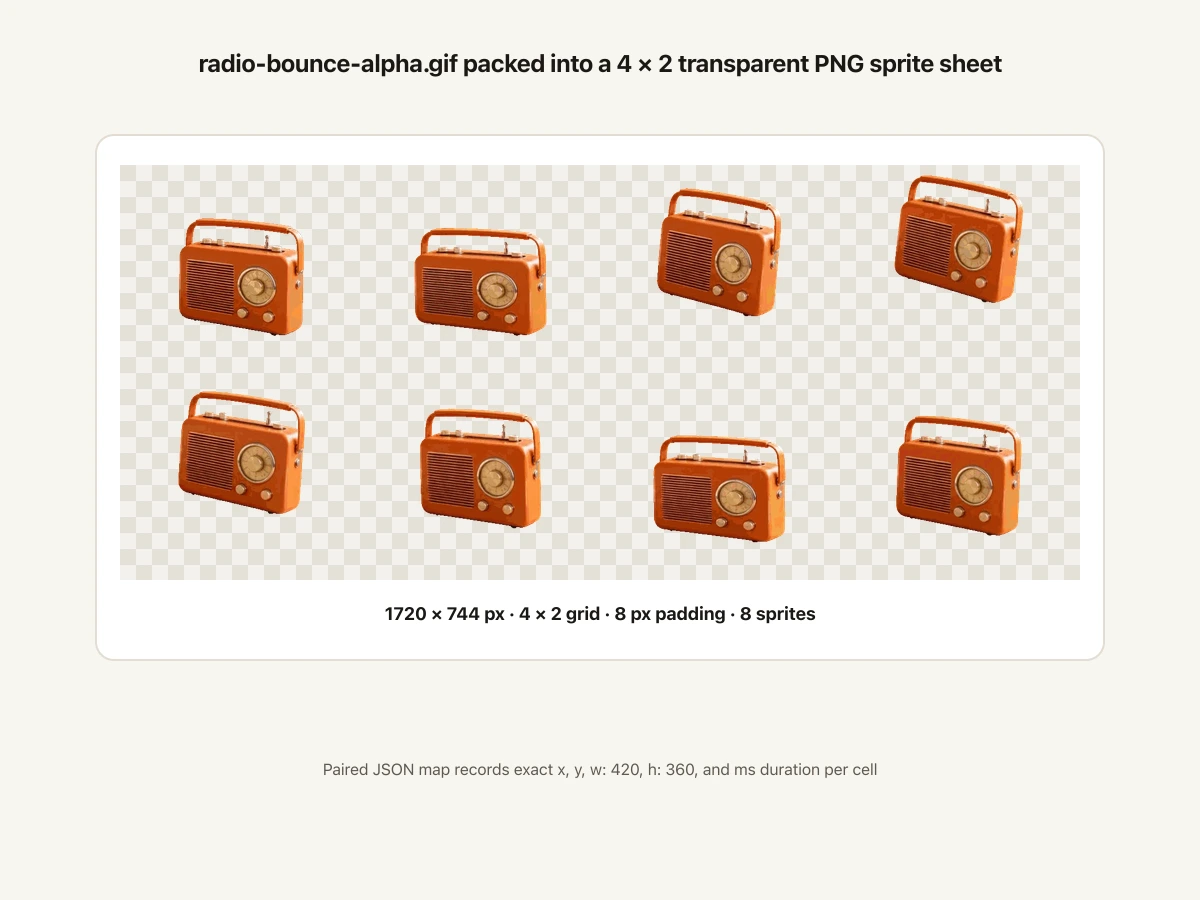
8-frame radio-bounce-alpha.gif packed into a 4x2 transparent PNG sprite sheet measuring 1720x744 px with 8 px padding
Columns, gutter padding & 4,096 px safety

Tune columns (1-16), prevent mipmap bleeding, and sample long GIFs cleanly

Avoid sub-pixel edge tearing when GPUs interpolate scaled sprites by keeping 2-8 px gutter padding around every tile, or dial Padding to 0 px for horizontal CSS steps() strips. For long loops, switch Frame step from All to 1/2, 1/3, or 1/4 while watching the live 4,096 px WebGL texture warning.

  • Auto square balances rows and columns automatically; Custom mode locks 1-16 columns
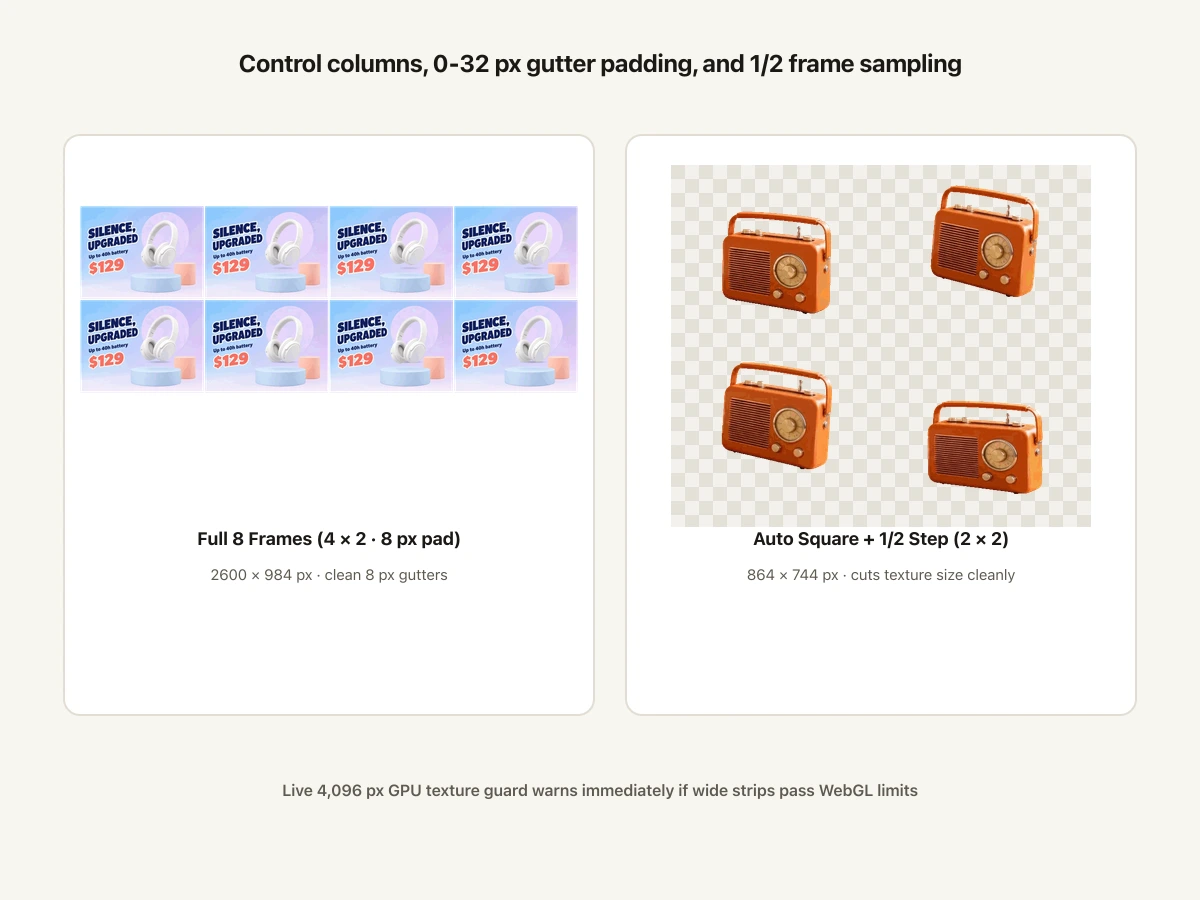
  • Frame step thinning cuts dense 60-frame sheets down smoothly (e.g., 864 x 744 px at 1/2)
  • Immediate yellow alert warns whenever atlas width or height crosses 4,096 px GPU caps
Comparison between full 8-frame 2600x984 px sprite sheet and 1/2 frame step 2x2 grid measuring 864x744 px

Sprite sheet settings across Phaser, PixiJS, Godot, Unity, and CSS steps()

Configure grid geometry once in LayerSplit so target engines slice your PNG cleanly without code hacks.

Target Engine / StackRecommended Columns & PaddingHow to Wire PNG + JSON
Phaser 3 & PixiJSAuto square · 4-8 px paddingPass fixed cell w/h + margin/spacing or iterate frames[].x, y, w, h and durationMs directly
Godot AnimatedSprite2DAuto square or Custom · 0 px paddingSlice directly in SpriteFrames grid using exact columns and rows from JSON meta
Unity Sprite EditorAuto square · 4-8 px paddingSet Grid By Cell Size (w x h) and Padding (matching exported px) to slice frames cleanly
CSS steps() animationCustom = total frames (single row) · 0 pxTranslate background-position across strip width using steps(frameCount) over total duration
WebGL mobile texturesAny mode keeping W & H <= 2048-4096 pxEnable Frame step 1/2 or 1/3 if the live 4,096 px texture guard triggers

Padding inserts uniform spacing around the outer edge as well as between cells, so frame #1 on an 8 px padded 420 x 360 cell starts at x: 8, y: 8 and frame #2 starts at x: 436, y: 8.

How to convert an animated GIF into a sprite sheet

  1. Open a sample or local animated GIF

    Inspect our transparent orange radio loop or promo banner immediately, or upload any local .gif up to 25 MB.

  2. Choose columns, padding, and frame sampling

    Pick Auto square or 1-16 custom columns (for instance 1 row for CSS strips), dial gutter padding between 0 and 32 px, and sample All or 1/2-1/4.

  3. Confirm dimensions against the 4,096 px GPU guard

    Review grid counts and final pixel dimensions on Checker, Light, or Dark backdrops so no tile touches neighbors cleanly.

  4. Download PNG sheet and paired JSON map

    Save the transparent PNG sprite sheet and its accompanying JSON coordinate index directly to your game asset folder.

Practical advantages for game developers and web motion designers

  • Uniform cell boxes keep anchors rock-steady

    Each cell matches the composited GIF canvas size, preventing frame jitter when characters bounce or raise limbs inside engines.

  • Prevents WebGL neighbor pixel bleeding

    Adding 4-8 px padding ensures bilinear texture filtering never pulls stray border pixels from adjacent frames onto sprites.

  • Shrink dense captures cleanly in one click

    Use 1/2, 1/3, or 1/4 sampling to trim heavy 30 FPS screen captures down into crisp sprites under 4,096 px per side.

  • Prepare clean assets across sister GIF tools

    Unpack individual stills in GIF to Frames, strip white boxes via Transparent GIF Maker, or pixelize shots in Photo to Pixel Art.

Ideal sprites & UI strip inputs

Indie 2D games in Phaser, Godot, PixiJS, and Unity, UI loading spinners using CSS steps(), retro pixel loops, and interactive canvas micro-animations.

Exact export & format boundaries to keep in mind

  • Accepts animated .gif files up to 25 MB and 64 megapixels; video files such as MP4, WebM, or MOV are not accepted directly.
  • Outputs a transparent PNG sheet paired with standard JSON metadata (meta plus frames[]); XML formats (such as Sparrow XML) and tight variable-trim bin-packing are not emitted.
  • Total grid dimensions above 4,096 px trigger a WebGL caution banner, and hard HTML5 canvas caps remain 16,384 px wide and 64 megapixels total.

GIF to Sprite Sheet questions and answers

What comes inside the exported JSON coordinate file?

The JSON carries a meta object (sheet width, height, columns, rows, cellWidth, cellHeight, padding, total duration) plus an ordered frames array giving index, name, x, y, w, h, and durationMs per frame.

Why does gutter padding matter between sprite sheet frames?

When 2D/3D engines render sprites at non-integer zoom or fractional positions, GPU linear sampling reads adjacent pixels. A 4 px or 8 px transparent gutter keeps neighboring tiles from bleeding onto sprite edges.

Why does a yellow warning appear when my sprite sheet passes 4,096 px?

Many mobile GPUs and WebGL contexts cap single texture dimensions at 4,096 x 4,096 px. Lower Columns to balance height vs width, or enable Frame step 1/2 or 1/3 to halve the frame count safely.

How do I make a horizontal 1-row sprite sheet for CSS steps() animation?

Switch Columns from Auto square to Custom, set columns equal to the total sampled frame count, set Padding to 0 px for zero-gap shifting, and download the flat horizontal strip PNG.

Does the sprite sheet keep my GIF's transparent background?

Yes. Disposal compositing runs on a clean 32-bit transparent canvas so background pixels export fully transparent in the final PNG sheet.

Can I convert an MP4 video to a sprite sheet or export XML coordinates here?

No. Input must be a .gif file (up to 25 MB), and metadata exports strictly as JSON alongside the transparent PNG atlas rather than XML.

Should I use uniform cells here or variable tight trim packing?

This converter uses a clean fixed-size grid anchored to your GIF's full dimensions so Godot hframes/vframes, Unity Grid By Cell Size, Phaser spritesheets, and CSS steps() work out of the box with zero registration jitter.

How do I create a sprite sheet from loose PNG artwork rather than a GIF?

Stack your PNG frames first in PNG to GIF, then drop that compiled loop straight into GIF to Sprite Sheet, or split a static character mockup cleanly via Character to Layers.

Are my uploaded GIFs saved or processed on remote servers?

No. All GIF LZW unpacking, canvas tiling, PNG compression, and JSON serialization run locally inside your browser tab on your device.

Need individual PNG stills or AI puppet layers first?

Extract standalone PNG keyframes via GIF to Frames, build fresh loops in PNG to GIF, or split flat character art into movable layers.

More browser sprite and layer utilities