Stencil Maker: Convert Photos to Printable Cut & Spray Stencils

Turn portraits, emblems, and pumpkin templates into 1-to-4 layer stencils in your browser: tune threshold, flag trapped islands in red so paper bridges stay intact, invert passes, and save PNG or printable PDF.

Opening browser tool…

Why clean stencils depend on luminance threshold and island bridge detection

Turning a gray camera photo into pure black-and-white threshold shapes looks simple on screen until you take a craft knife to heavy paper or Mylar. Whenever a white background cutout surrounds an isolated black eye pupil, shoe sole, or inner letter counter (such as O, A, R, or D), cutting out that ring detaches the floating center completely unless you draw a narrow tab bridging across.

This browser stencil maker analyzes grayscale luminance after optional box smoothing, splits artwork into 1L cut plates or 2L, 3L, and 4L tonal passes, and runs connected-components detection on every dark shape trapped away from the border, highlighting affected regions in crisp vermilion (#d63f14) so you know right where to bridge.

Adjust threshold, smoothing, and Invert live inside your own browser tab with zero server uploads, no account sign-in, and no watermarks stamped on exported PNGs or printable PDFs.

1L island check & 2L-4L spray bands

Spot trapped islands in red before cutting or step up to 4 tonal layers

Stay on 1L for classic single-sheet carving, bakery templates, and Mylar street stencils while Highlight trapped islands flags detached black pieces right inside the live canvas. Step up to 2L, 3L, or 4L when building layered halftone posters and multi-pass spray stencils.

  • Threshold (20-235) controls precisely which midtones snap dark vs paper white
  • Edge smoothing (0-5 px) merges scattered speckle dots into calm cuttable shapes
  • Live floating badge counts trapped islands (visible automatically in 1L mode)
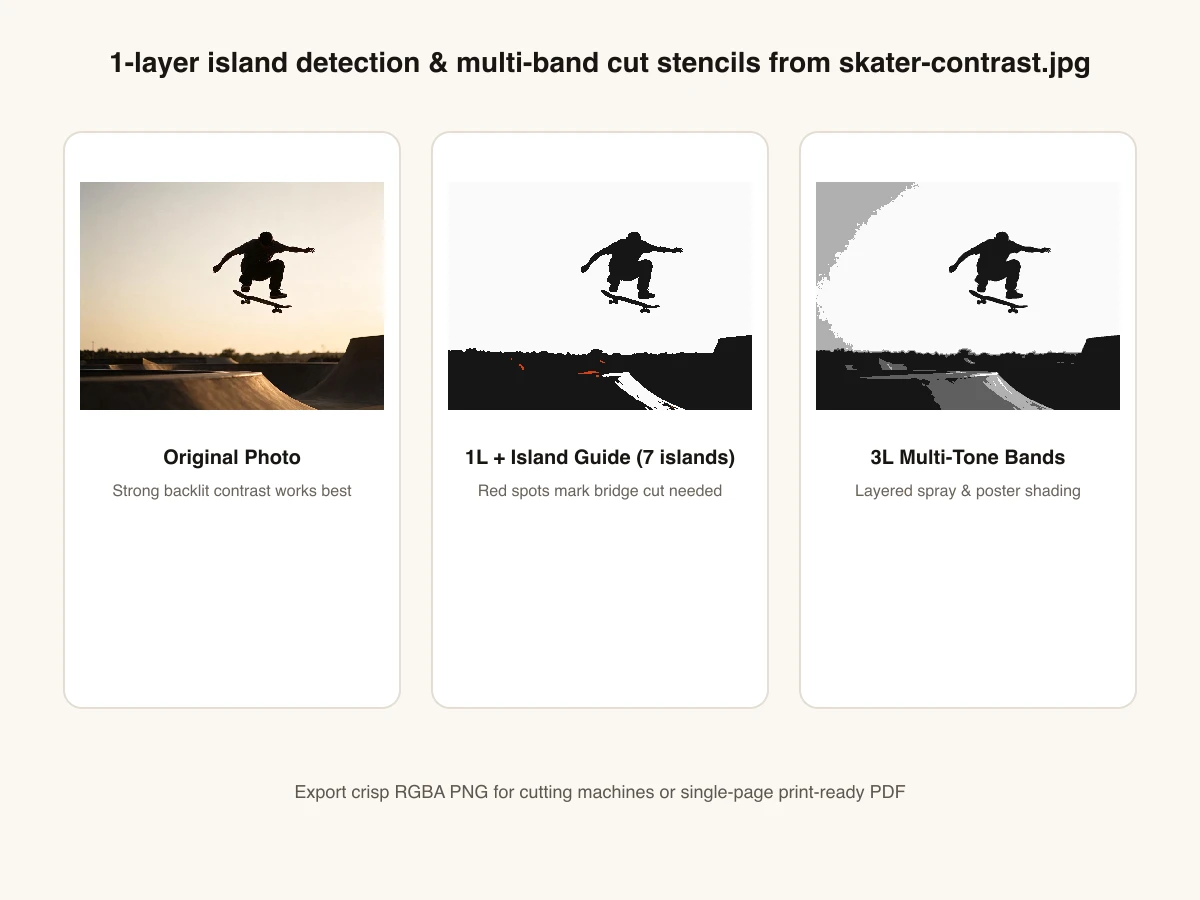
Skater photo converted into 1L cut stencil with 7 trapped islands highlighted in red and a 3L multi-tone spray stencil
Invert toggle & print-ready PDF

Flip ink openings with Invert and save crisp PNG or printable PDF

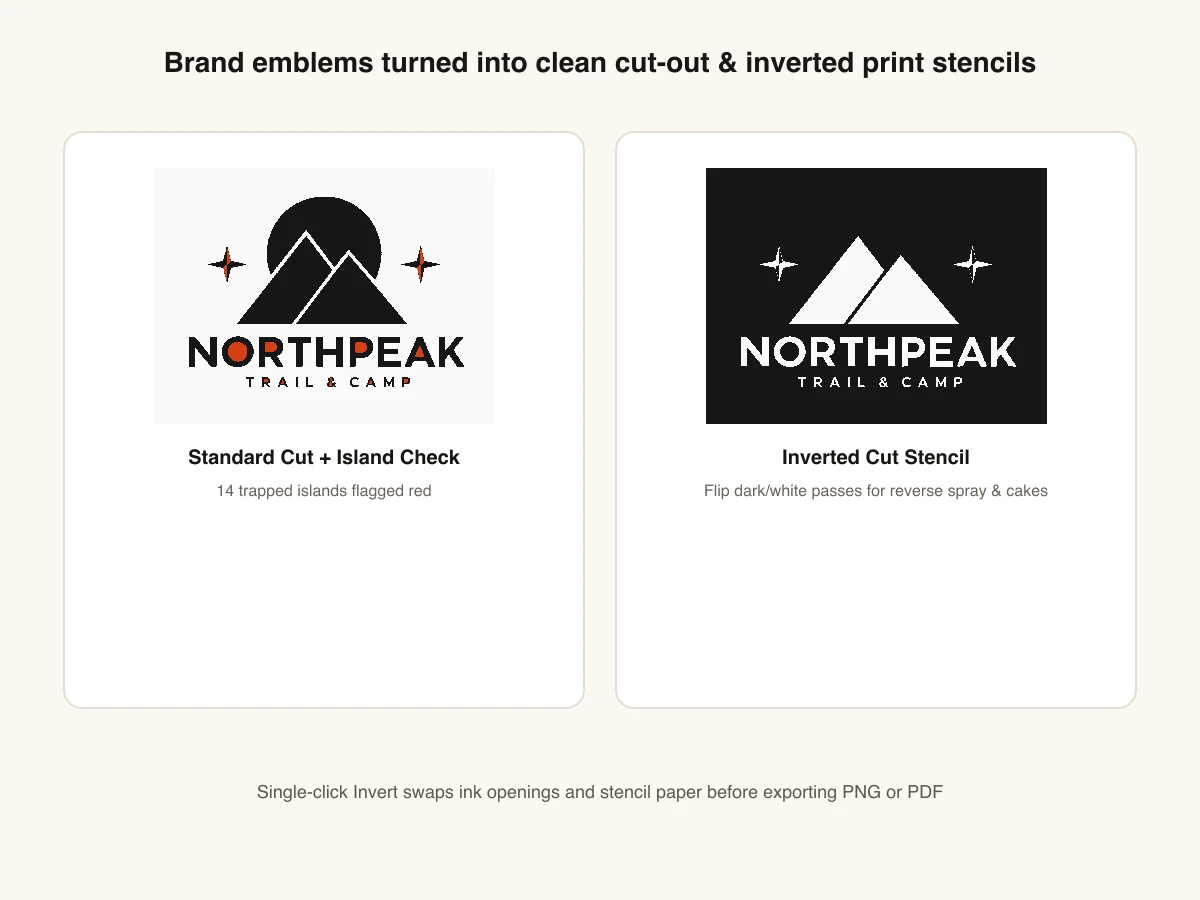
Different crafts reverse positive and negative shapes: wood-burning and cake cocoa dusting cut open shapes you keep dark, whereas bleached shirts or reverse spray layers block the subject out. Click Invert once to swap ink plates cleanly, then save a lossless PNG or full-bleed single-page PDF.

  • Single-click Invert reverses cut openings without losing smooth edge anti-aliasing
  • PNG exports crisp grayscale-to-RGBA pixels suited for tracing, decals, or laser previews
  • PDF packages artwork cleanly onto one full-bleed page sized to match your stencil ratio
Northpeak Trail emblem in Standard 1L cut with 14 red island flags versus Inverted white-on-black stencil

Stencil layer counts and real-world craft settings

Choose layer bands and edge smoothing matched to your cutting material and workflow.

Mode & SettingsBridge / Island RiskBest OutputIdeal Craft & Tracing Projects
1L · Smooth 1-2 pxFlags enclosed black islands in redPrintable PDF or PNGPumpkin carving patterns, paper cutouts, cocoa cake screens
1L · Invert · Smooth 2 pxCheck negative sky/ring bridges manuallyLossless PNG or PDFReverse bleach shirts, glass etching, positive badge masks
2L · Threshold 130-160Two flat tone regions stacked sequentiallyPNG plates or PDF proofHigh-contrast wall stencils, skateboards, clean tote bags
3L-4L · Smooth 1-3 pxStacked tonal passes add depthLossless PNGMulti-pass spray street posters, painted canvas blocking
Backlit reference -> 1LSimplifies shadows clearly for hand tracingPNG reference sheetStarter stencil prep before manual tattoo outline tracing

High-contrast backlit photos or clean logos cut cleanly on the first slider nudge. Busy living-room walls around a subject convert much better after removing the room in Background Splitter.

How to turn a photo into a printable stencil

  1. Load a portrait, logo, or high-contrast photo

    Test immediately with our backlit skater photo or Northpeak Trail emblem, or upload any JPG, PNG, or WebP up to 25 MB.

  2. Pick 1L-4L layers and adjust threshold

    Slide Threshold between 20 and 235 to balance shadow thickness, increase Edge smoothing (0-5 px) to drop tiny dust dots, and check Invert if needed.

  3. Inspect red trapped-island bridge warnings

    Keep Highlight trapped islands active in 1L mode so red flags warn you which isolated shapes will fall out unless bridged before cutting.

  4. Export lossless PNG or single-page printable PDF

    Download PNG for digital editing and trace workflows, or click Printable PDF to write a ready-to-print page straight to disk.

Built for physical makers, decorators, and graphic preparers

  • Pumpkin carving, coffee & cookie stencils

    Keep jack-o-lantern eyes and mouth ridges attached cleanly by spotting disconnected black regions before printing patterns on cardstock.

  • Multi-layer spray painting and wall murals

    Switch between 2L, 3L, and 4L passes at matched registration framing so highlight, midtone, and key shadow bands align cleanly.

  • Realistic note on tattoo & vinyl workflows

    Great for distilling reference lighting into bold black-and-white shapes you trace on transfer paper, though it does not generate continuous thin thermal outline vectors automatically.

  • Runs strictly inside your browser tab

    Images above 25 MB or 64 megapixels can be scaled cleanly to 4,096 px with one click, and personal photos never leave your device.

Practical uses vs honest format boundaries

Makers, hobby crafters, bakers, street muralists, and sign painters turning contrast photography or graphics into printable 1-to-4 tone guides.

Exact export boundaries to know before starting

  • Printable PDF writes your stencil cleanly onto one single page at full canvas proportions; it does not auto-tile oversized murals into multi-page Letter grids.
  • Outputs lossless bitmap PNG and single-page PDF rather than native Cricut/Silhouette vector SVG cut paths. If you want true vector dots or separated color plates, use Halftone Generator or Posterize Image.
  • Photos where dark foreground hair blends into dark bookshelves merge at flat luminance thresholds. Cleanly isolate subjects first in Background Splitter or craft soft-edge cutouts with Silhouette Maker.

Stencil Maker questions and answers

What does Highlight trapped islands in red show inside Stencil Maker?

In 1-layer mode, any dark foreground region completely surrounded by cuttable white space lacks a connection to the outer stencil frame and would fall out of paper. Red highlighting pinpoints those islands so you can widen threshold, raise edge smoothing, or sketch thin holding bridges.

Can I export an SVG cut file directly for Cricut Design Space or Silhouette Studio?

This tool exports lossless PNG (which Cricut Design Space imports via Upload Image cleanly for Print Then Cut or Simple Cut tracing) and a full-bleed single-page printable PDF. It does not generate direct vector SVG stroke paths.

How does Printable PDF handle big posters? Does it split across multiple Letter pages?

Printable PDF outputs one clean single-page PDF scaled to your stencil canvas dimensions. Multi-page poster tiling is not built in, though PDF viewers like Adobe Reader Poster print mode can tile that single-page PDF onto multiple home sheets.

Should I use Stencil Maker as a tattoo stencil maker?

Threshold mode is helpful for breaking high-contrast photo references into readable shadow maps before hand-tracing stencil lines. It creates solid black/grayscale tonal plates rather than contour-only thermal outlines.

What is the difference between Stencil Maker and Silhouette Maker?

Stencil Maker renders solid black-on-white or multi-band cut patterns with red trapped-island detection and printable PDF export. Silhouette Maker creates feathered transparent RGBA PNG shapes over alpha checkerboards or custom ink fills.

When do I pick 1L vs 2L, 3L, or 4L layers?

Choose 1L for classic single-stencil spray, pumpkin carving, and vinyl cutouts. Switch to 2L, 3L, or 4L when painting multi-step grayscale shading or splitting tone hierarchy for murals and posters.

What does the Edge smoothing slider (0-5 px) control?

Increasing Edge smoothing gently blurs tiny photographic skin pores and leaf noise before thresholding, eliminating pinprick islands and yielding smooth craft-knife curves.

Why does Invert matter for cake dusting, bleach, and spray art?

If dark areas represent paint openings rather than stencil paper (or vice versa), Invert flips every threshold band in one click without resetting your smoothness or threshold tuning.

Does the stencil tool work offline and on mobile phones?

Yes. Processing runs locally in browser workers with zero upload, and mobile phones stack the live compare canvas cleanly above controls and a sticky export bar.

Clean up busy backgrounds or split poster art into layers first?

Lift subjects cleanly out of indoor clutter with AI credits, or convert multi-color illustrations into separate Photoshop ink layers.

More craft, cutout, and stencil tools