Photo to Pixel Art: Turn Photos & Portraits into Crisp Sprites

Convert any photo or portrait to pixel art offline in your browser: dial grid width from 16 to 128 px, match PICO-8, GameBoy, NES, or K-Means palettes with optional dithering, and save integer PNG or vector SVG.

Opening browser tool…

Why real pixel art conversion box-averages cells before quantizing

Resizing a camera photograph with ordinary point sampling picks arbitrary single pixels, turning fine leaves, hair strands, or building trim into flickering confetti noise. True sprite conversion takes the opposite order: it divides the source picture cleanly into equal grid cells first, averages every sub-pixel inside each cell smoothly, and only then snaps each square block to the target palette.

This browser pixel art converter calculates cell averages locally across any aspect ratio, keeps existing PNG alpha transparency intact whenever pixels sit below 50% opacity, and exports sharp integer-scaled PNG sheets or compact run-length-merged SVG rectangles with zero blurry anti-aliasing.

Everything runs directly inside your browser worker memory with no sign-up, no watermarks, no daily export limit, and no image bytes uploaded to any remote server.

Grid resolution & retro palettes

Pick 16-128 px grid width with PICO-8, GameBoy, NES, or Auto K-Means

Dial Grid width cleanly between 16 px and 128 px (or click presets at 32 px, 64 px, 96 px, and 128 px) to trade chunky retro readability against fine architectural detail. Pair any grid size with authentic hardware-inspired color tables or compute a custom Auto K-Means palette directly from the photo.

  • PICO-8 (16): warm reds, oranges, and bright sky blues ideal for vibrant scenes
  • GameBoy (4): classic four-tone olive monochrome tuned for silhouette contrast
  • NES (24) & Auto K-Means: broader retro hues or up to 16 scene-matched swatches
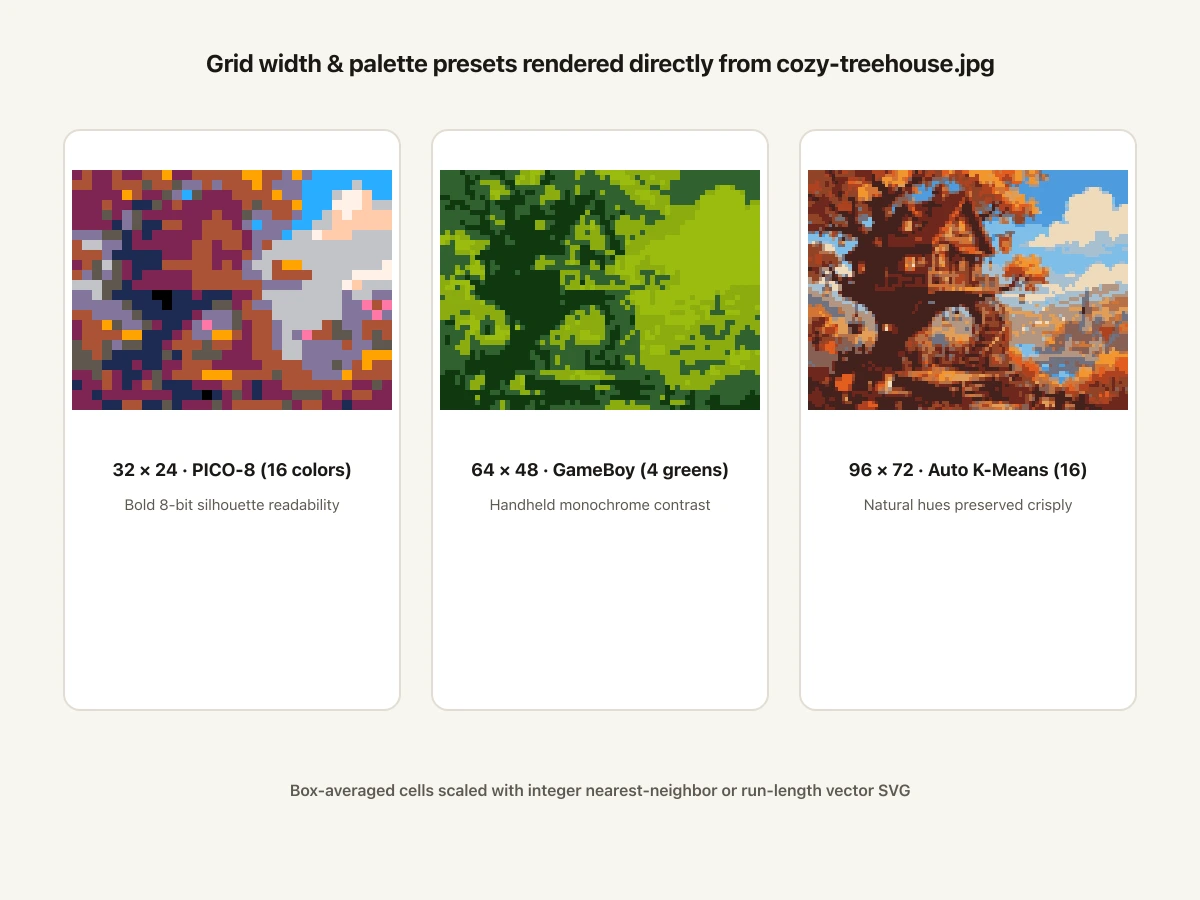
Comparison of cozy-treehouse.jpg converted at 32x24 PICO-8, 64x48 GameBoy 4-green, and 96x72 Auto K-Means palettes
Dithering & crisp vector SVG

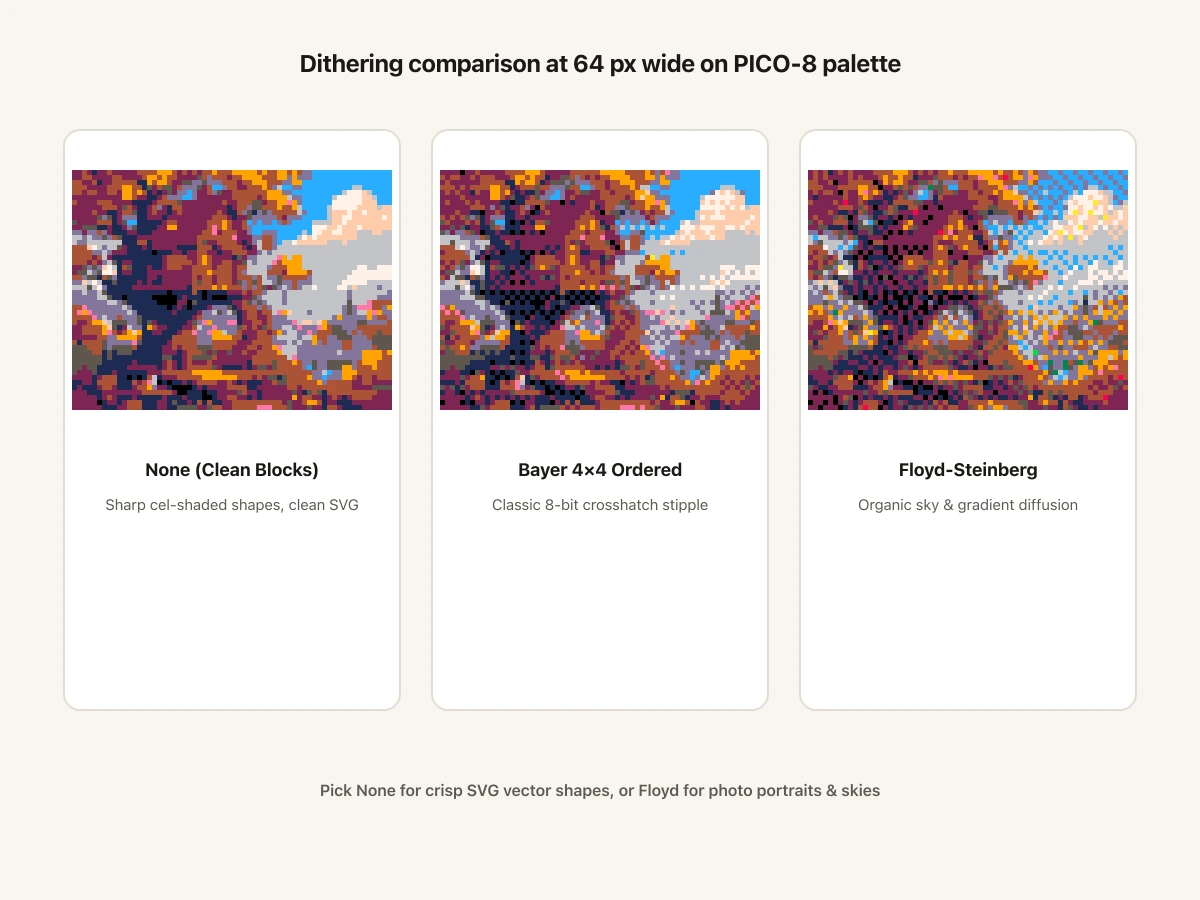
Control clean flat blocks, Bayer 4x4 checks, or Floyd-Steinberg stipples

Flat shading keeps sprites tidy and minimizes SVG rectangle count, while ordered Bayer 4x4 dithering introduces classic handheld crosshatch transitions across sunsets and wooden roofs. When smooth photographic gradients need softer transitions, Floyd-Steinberg distributes quantization error organically.

  • Integer PNG scaling presets (1x, 4x, 8x, 16x) keep square pixels razor-sharp
  • Download SVG merges horizontal adjacent pixels of identical hex color into minimal rect elements
  • Existing transparent cutouts stay transparent in both PNG and crispEdges SVG outputs
Three dithering passes at 64 px wide PICO-8 on cozy-treehouse.jpg showing None flat blocks, Bayer 4x4 ordered checks, and Floyd-Steinberg grain

Choosing pixel grid dimensions from 16x16 icons up to 128 px scenes

Match source subject framing to the grid resolution before picking export scale.

Grid WidthPreset / Target UseBest Palette & DitherRecommended Output
16-24 px wideTiny 16x16 pixel art icons, RPG inventory items, faviconsPICO-8 (16) or NES (24) · None16x PNG (256+ px preview) or lightweight SVG
32 px wideCharacter avatars, stream badges, retro tile iconsPICO-8 or GameBoy (4) · None / Bayer8x or 16x integer PNG or SVG vector
64 px widePortrait sprites, Discord stickers, indie item cardsAuto K-Means or NES · Bayer 4x48x PNG (512 px wide) with transparent backdrop
96 px wideBalanced scenic art, treehouse & landscape demosAuto K-Means (16) · None or Floyd4x or 8x PNG or crispEdges SVG poster
128 px wideDetailed cityscapes, complex interiors, multi-subject scenesAuto K-Means or NES · Floyd4x PNG (512 px) cleanly under web budgets

Tiny 16x16 and 32x32 sprites read best when the main subject already fills most of the frame. Cluttered scenes turn busy quickly below 64 px unless you lift the subject first.

How to convert a photo to pixel art online

  1. Open a sample or local image

    Start immediately on our autumn treehouse, coastal cliffs, or portrait samples, or drop any JPG, PNG, or WebP up to 25 MB.

  2. Set grid width, palette, and dithering

    Slide Grid width between 16 px and 128 px, switch among PICO-8, GameBoy, NES, and Auto K-Means palettes, and test Bayer or Floyd dithering.

  3. Drag the split-compare divider

    Sweep the live canvas handle back and forth to confirm facial silhouettes, bright sky highlights, and sprite edges hold together clearly.

  4. Save integer PNG or clean vector SVG

    Choose 1x, 4x, 8x, or 16x PNG multiplier (staying within 64 MP) for immediate sharp pixels, or export run-length-merged vector SVG.

What this pixel art converter handles best and clear scope boundaries

Ideal projects for browser pixel art quantization

Indie devs prototyping placeholder sprites from reference photos, creators crafting retro Twitch avatars or cross-stitch pattern grids, and designers producing clean 8-bit thumbnails.

Practical limits & troubleshooting tips

  • Converts one uploaded image at a time rather than batching folders or opening a manual pixel-by-pixel drawing canvas.
  • Large source images above 25 MB or 64 megapixels can be downscaled inside your browser to 4,096 px with one click before pixelizing; PNG export caps at 64 MP total output.
  • Dense paragraphs of small 10 px text cannot remain legible below a 96 px grid. Switch to Stencil Maker or SVG to PNG when crisp lettering matters.

Photo to Pixel Art questions and answers

Is converting a photo to pixel art free with no watermarks or daily cap?

Yes. Pixel grid downsampling, palette quantization, dithering, and both PNG and SVG downloads run free inside your browser with zero watermarks and no sign-up.

Why does Auto K-Means look truer to landscapes while PICO-8 feels more retro?

Auto K-Means clusters up to 16 representative colors directly from your uploaded picture, preserving natural wood, foliage, and sky tones. PICO-8 (16), NES (24), and GameBoy (4) lock colors strictly to classic fixed console swatches.

How should I turn a portrait into clean 16x16 or 32x32 pixel art without muddiness?

Crop tight on the face before uploading, remove cluttered backgrounds first in Background Splitter if needed, keep Grid width around 32-48 px (or 16 px only for bold icons), and try PICO-8 or Auto K-Means with Dithering set to None.

When should I pick None versus Bayer or Floyd-Steinberg dithering?

Keep Dithering on None for clean flat shapes and lightweight SVG export. Choose Bayer (4x4) for ordered nostalgic handheld crosshatching, or Floyd for smooth skies, mist, and photographic skin transitions.

Does the pixel art converter keep transparent PNG backgrounds?

Yes. Any transparent source area where alpha is below 128 stays completely transparent in the downsampled pixel preview, scaled PNG output, and crispEdges SVG file.

What does Export Scale 1x, 4x, 8x, or 16x actually change?

Export Scale multiplies every pixel-grid cell by an exact integer factor using nearest-neighbor scaling. A 64 px grid exported at 8x produces a razor-sharp 512 px wide PNG with zero interpolation blur.

How does Download SVG export crisp pixel art without blurry filters?

Rather than embedding a bitmap inside SVG, the exporter merges horizontal runs of identical hex colors into clean vector rectangle elements with shape-rendering set to crispEdges.

Is this an AI pixel art generator that invents artwork from text?

No. It deterministically converts your own JPG, PNG, or WebP picture via cell averaging and color quantization, preserving your exact silhouette and framing.

Are my uploaded photos sent to any server or stored?

No. Decoding, K-Means palette discovery, dithering, and file export all run purely in your browser memory and Web Workers on your own device.

Does the studio work comfortably on mobile phones?

Yes. On narrow phone screens, controls stack cleanly below the live comparison stage with a sticky bottom Download PNG button.

Ready to split transparent sprite parts or animate your frames?

Use AI layer splitting to separate messy rooms or flat characters before pixelating, or animate exported pixel PNGs into loops.

More browser pixel and vector utilities