How to Convert a PSD File to PDF: Photoshop and Free Routes
Convert a PSD to PDF with Save As Photoshop PDF, choose print or screen settings, combine several PSDs, or convert free in your browser with no upload.
On this page5 sections
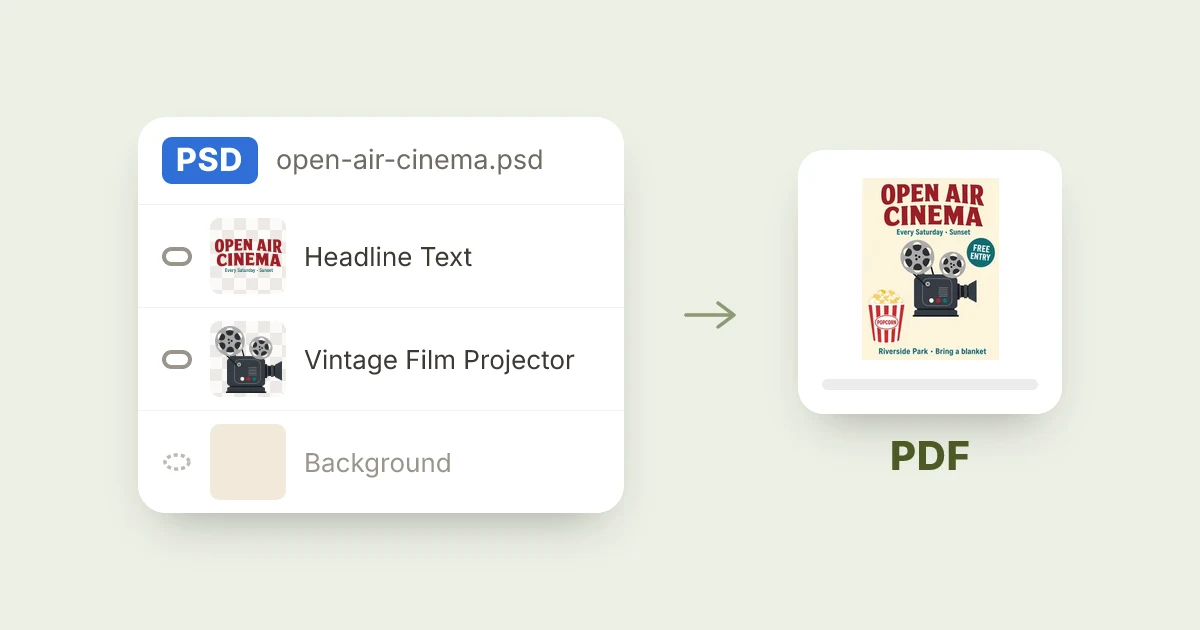
To convert a PSD to PDF in Photoshop, choose File > Save As, pick Photoshop PDF, select an Adobe PDF preset and click Save PDF. Without Photoshop, convert up to 50 PSD or PSB files directly in your browser with PSD to PDF (single proof, one page per layer, or both, with zero upload), or export a PNG/JPG and use macOS Save as PDF or Windows Microsoft Print to PDF.
Which kind of PDF do you need?
Photoshop supports two kinds of PDF (Adobe file formats):
- You or another designer must reopen it in Photoshop with layers intact
- You enable Preserve Photoshop Editing Capabilities in Save Adobe PDF
- File size can be larger to retain editing data
- It is a finished proof for reading, emailing or commercial printing
- You want the smallest reliable file via an Adobe PDF preset
- Anyone without Photoshop will open it
1How to save a PSD as PDF in Photoshop
Following Adobe’s Save as Photoshop PDF guide (use File > Save a Copy instead if the open file must stay a .psd per Save files in Photoshop):
- Open Save AsChoose File > Save As and select Photoshop PDF as the format.
- Choose colour and layersTick Color to embed the colour profile, and Layers if keeping editing data, then click Save.
- Pick an Adobe PDF PresetMatch the preset to print or screen (table below), and optionally set PDF/X Standard, Acrobat Compatibility and Compression or Security options (encryption options depend on Compatibility).
- Click Save PDF.
| Preset | Made for | Notes |
|---|---|---|
| High Quality Print | Desktop printers and proofs | Keeps images clear and colours as they are |
| Press Quality | Commercial printing | High quality, with colours set up for professional printing |
| PDF/X-1a, PDF/X-3 | Professional print workflows | ISO standards for reliable print exchange; ask your printer which one |
| Smallest File Size | Web pages and email | Reduces image quality; not meant for print |
Per Adobe’s PDF presets overview, start with High Quality Print or your printer’s PDF/X standard for print (keeping the colour profile embedded), or Smallest File Size for email and web downloads.
Combine several PSDs or artboards into one PDF
- Separate PSD files: File > Automate > PDF Presentation > Add Open Files / Browse > drag page order > choose Multi-Page Document > Save (writes a generic viewing PDF; save each as Photoshop PDF if layers must stay editable).
- One PSD with artboards: File > Export > Artboards To PDF > Multi-Page Document (or Document Per Artboard), ZIP or JPEG (0–12 Quality) and Include ICC Profile.
2How to convert a PSD to PDF without Photoshop
You can convert PSD and PSB files directly in your browser with LayerSplit’s free PSD to PDF converter, with nothing uploaded and no Photoshop needed. A browser cannot write an editable layered Photoshop PDF for reopening in Photoshop, so this route produces an image-based viewing or printing PDF (as a 1-page proof, one PDF page per layer, or both).
- Add PSD filesLoad up to 50 PSD or PSB files (up to 200 MB each) in PSD to PDF.
- Choose page size & modePick Match PSD, A4, or US Letter, and save Whole image, Every layer, or Both.
- Pick compressionUse JPEG (50–100 quality) for compact email proofs or Lossless Flate RGB for crisp UI text.
- Download PDF or ZIPSave one
.pdfdirectly, or download a batch ZIP with one PDF per PSD.
If you prefer an OS print workflow instead, you can still inspect layers in PSD Viewer or export flat images via PSD to PNG / PSD to JPG, then use Save a document as a PDF or Combine files into a PDF on a Mac, or Microsoft Print to PDF on Windows (if missing from the printer list, re-enable it in Windows Features per Microsoft June 2025 update note).
Turn PSD and PSB files up to 200 MB into a 1-page proof or a multi-page layer PDF at Match PSD, A4, or Letter size with no account and no upload. Not sure what is inside a PSD yet? See how to open a PSD without Photoshop.
FAQ
How do I convert a PSD file to PDF?
In Photoshop, choose File > Save As, select Photoshop PDF, choose an Adobe PDF preset and click Save PDF. Without Photoshop, drop the file into LayerSplit’s free browser PSD to PDF converter and download a 1-page proof or multi-page layer PDF directly.
Does a PDF keep the layers of my PSD?
Only a Photoshop PDF saved with Preserve Photoshop Editing Capabilities, and only when it is reopened in Photoshop. In a PDF reader you see the finished picture, not editable Photoshop layers, though choosing Every layer in PSD to PDF puts each PSD layer onto its own PDF page for review.
Which PDF preset should I use for printing?
High Quality Print suits desktop printers and proofs, and Press Quality suits commercial printing. If your print shop asks for PDF/X-1a or PDF/X-3, use that preset, because those are the standards their workflow checks.
How do I make a smaller PDF from a PSD?
Choose the Smallest File Size preset, or lower the image quality and resolution in the Compression panel of the Save Adobe PDF dialog. In the browser converter, choose JPEG compression (around quality 85–90), scale down to 50% or 2048 px longest side, or export Whole image instead of Every layer.
How do I combine several PSD files into one PDF?
In Photoshop, use File > Automate > PDF Presentation and choose Multi-Page Document. Without Photoshop, queue up to 50 PSDs in PSD to PDF for a batch ZIP, or export images and select them in Finder on a Mac with Quick Actions > Create PDF.
Can I convert a PSD to PDF online for free?
Yes. LayerSplit’s browser PSD to PDF tool converts PSD and PSB files directly on your device with no upload, no sign-up, and no watermarks.